

Vine Smart Thermostat for House with Nightlight, 4.3 Inches WiFi Thermostats for Home Compatible with Alexa and Google Assistant, 7day x 8period Programmable, C-Wire Required
$23.99
Related Products




Product description

The video showcases the product in use.The video guides you through product setup.The video compares multiple products.The video shows the product being unpacked. Thermostat for House Merchant Video


1 𝗖𝗼𝗺𝗽𝗮𝘁𝗶𝗯le
2 𝗘𝗻𝗲𝗿𝗴𝘆 𝗦𝗮𝘃𝗶𝗻𝗴
3 𝗜𝗻𝘀𝘁𝗮𝗹𝗹𝗮𝘁𝗶𝗼𝗻
4 𝗖𝗼𝗻𝘃𝗲𝗻𝗶𝗲𝗻𝘁


vine Smart Programmable Thermostat
Add to Cart
Customer Reviews
4.0 out of 5 stars 320
3.8 out of 5 stars 612
3.6 out of 5 stars 145
3.6 out of 5 stars 145
5.0 out of 5 stars 1
Price
—
$56.99$56.99
$98.90$98.90
$98.99$98.99
$19.99$19.99
Screen Size
4.3″
2.8″
4.0″
4.0″
/
Screen Operation
Touchscreen
3 Touch Buttons
Touchscreen
Touchscreen
/
Optional Wallpaper
✘
✘
✔
✔
✘
Backshell Color
White
White
White
Grey
/
Nightlight
✔
✘
✘
✘
✘
【Compatibility Pre-Check】This programmable thermostat is compatible with 90% of 24V AC systems, including Conventional 2H/2C(Gas, Oil, Electric, Boiler); Heat Pump 2H/2C with Aux/Emerg. heat, and Heat or Cool only systems. Scan the QR code for a simple compatibility check before purchase. Note: A common wire (C-wire) is required for all vine thermostats
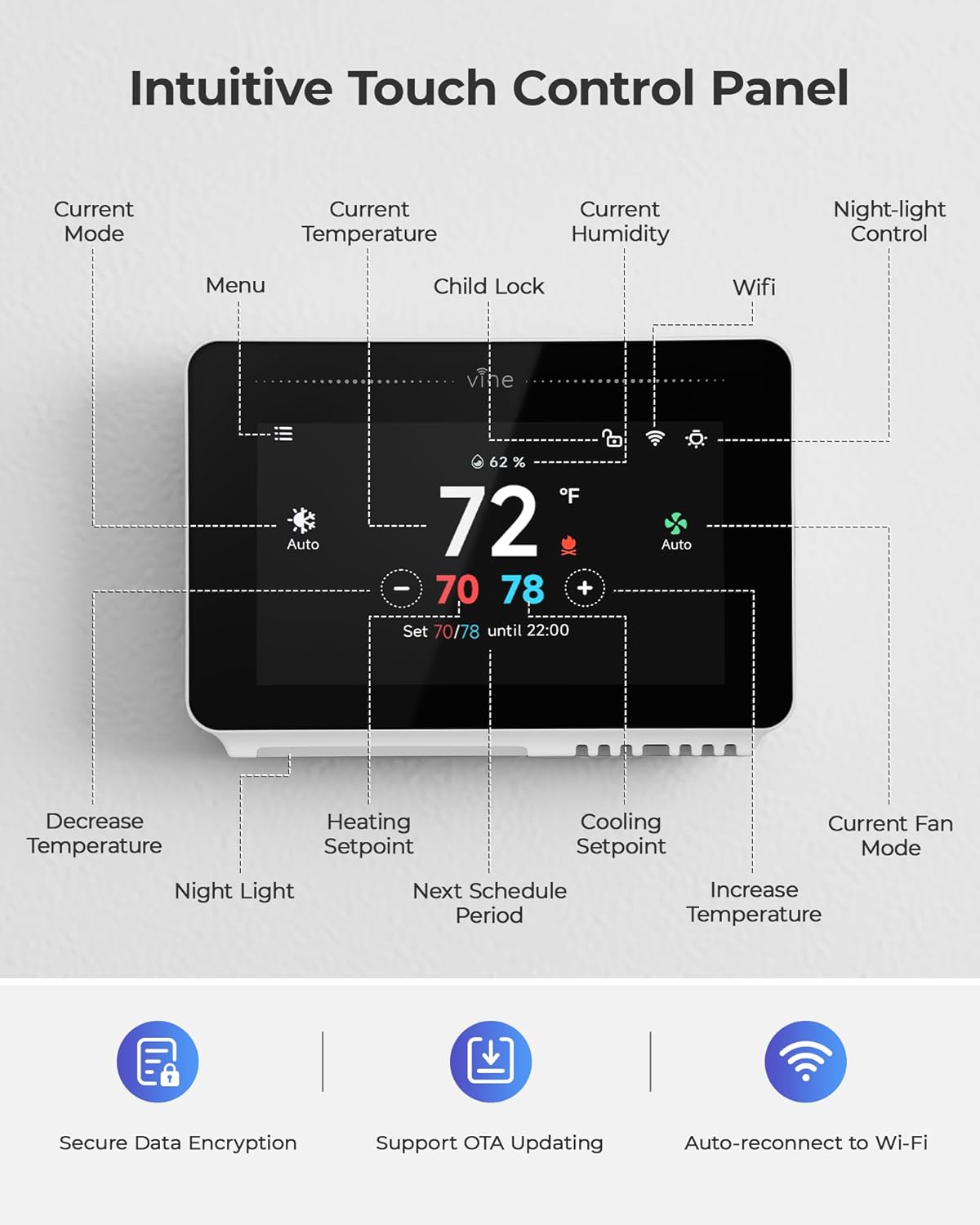
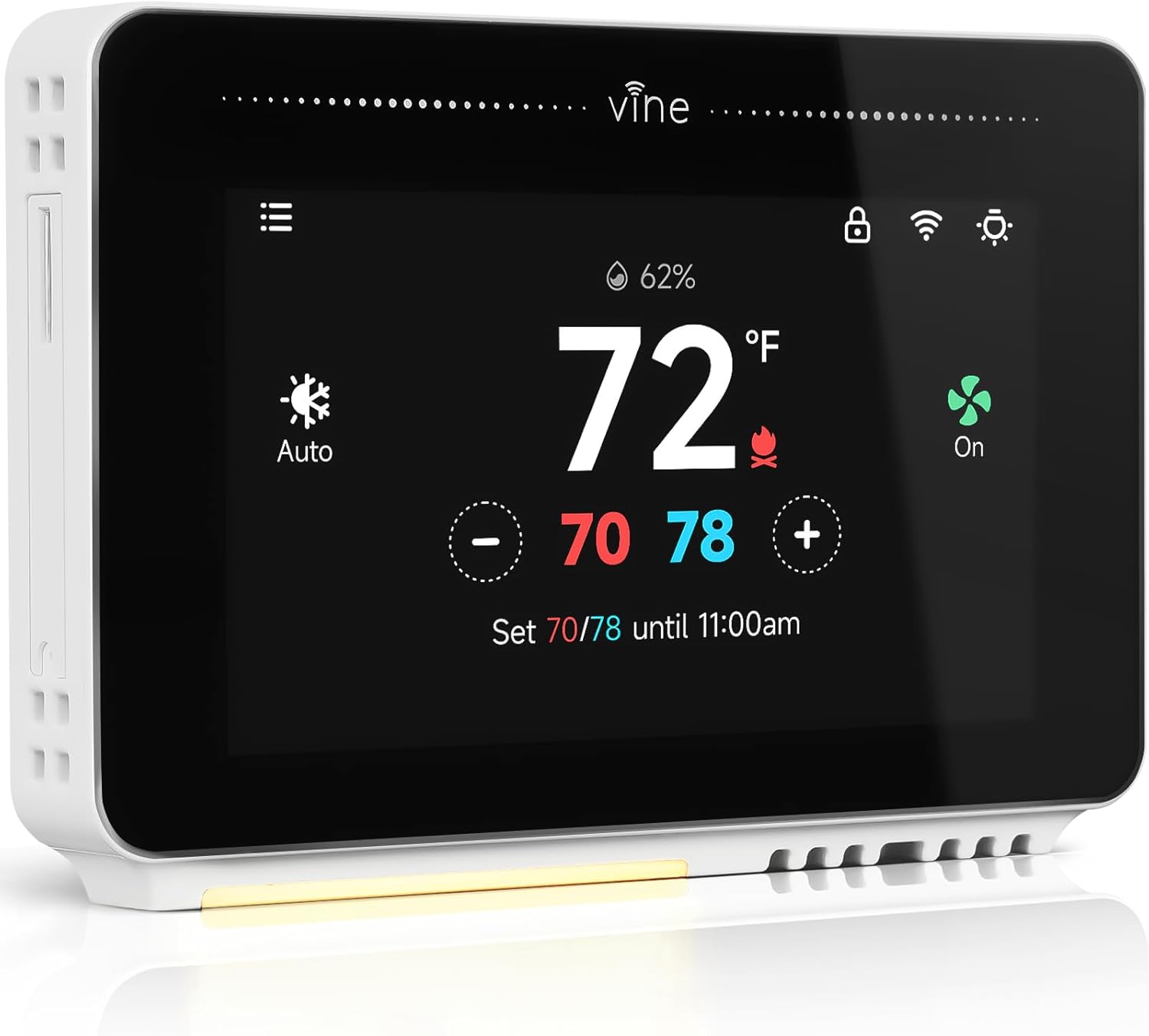
【Crisp Touchscreen & Nightlight】Enjoy an exceptional viewing experience on the 4.3″ large touchscreen, and features a gentle night light function, this smart thermostats for home ensuring perfect visibility whether in bright daylight or dark rooms, all while being incredibly user-friendly
【Remote & Voice Control】Manage your home’s climate from anywhere using the Vine Thermostat or Smart Life app. Works with Alexa and Google Home to control the wifi thermostat with your voice, providing hands-free operation
【Energy Savings & Smart Life】The ac thermostats for home supports 7-day flexible scheduling and an Auto Home/Away mode. It intelligently adjusts temperatures to maintain comfort while you’re home and saves on HVAC energy costs when you’re away, reducing unnecessary spending
【Multi-Smart Features 】 Features data encryption security, support OTA, Wi-Fi auto reconnect, fan Control and weather forecasting functionality, our home thermostat for ac and heating ensuring your convenience and peace of mind in daily life
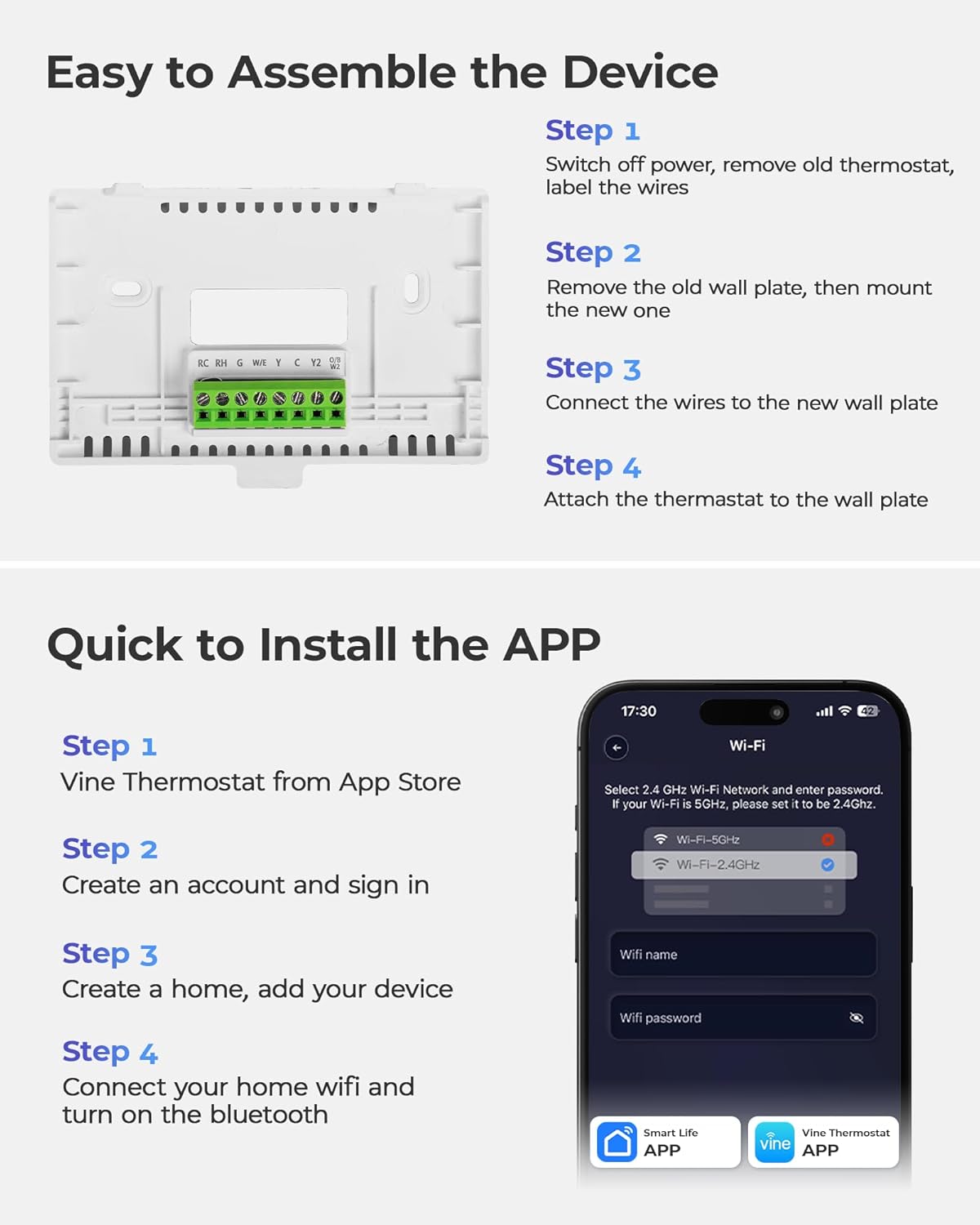
【Quick DIY Installation 】Package includes thermostat, wall plate, mounting hardware, wire label, installation guide. Our programmable thermostat for house can be installed easily in 30 minutes or less with step-by-step guides and online videos
8 reviews for Vine Smart Thermostat for House with Nightlight, 4.3 Inches WiFi Thermostats for Home Compatible with Alexa and Google Assistant, 7day x 8period Programmable, C-Wire Required
Add a review

$23.99
Amazon Dad –
Beautiful Unit to Replace Nest
My Nest was set to lose support this month, so it was time to replace it. I’m not all that happy about the situation, so I decided to go another route.I’m glad that I found the Vine thermostat! It really compliments my interior and has a beautiful screen. I like that it also acts as a nightlight for the kids. And it’s easy enough to use that they were able to figure it out without me having to teach them a full masterclass. The nest unit wasn’t as logical without explanation.I like being able to access it on my phone at home or away. And also it is really nice that it is integrated with my Alexa devices, so I rarely need to use my app.It’s able to tell when I’m away, so I don’t need to set it every day. But I can set it to turn on or off at times when I know nobody will be home – potentially saving me lots of money!Installation was a breeze for me. My home is pretty uncomplicated. I’ve got one unit with a C wire and a heat pump with emergency heat. I would make sure you have a C wire if you are looking into installing a thermostat. Otherwise, you may need a battery powered device, run a C wire from your unit, or get creative with some sort of power supply. Most won’t have to worry about it, but I wanted to give a little warning just in case.Overall, it’s a beautiful unit that does everything I want it to. It saves energy which saves me money, and it feels like a quality device that I think will last a long time.
Shanette –
Great item
Easy to install and manage once it was up and in place
Amazon Customer –
DO NOT RECOMMEND
I’ve seen another customer has had the same results as I have. It was great until it wasn’t!! I got mine on August 22nd 2025. Installed the same day. It worked until about 2 weeks ago. I noticed that my heat wasn’t cycling like it normally does. My house was built in 1914 it’s not insulated great at all. I have been having to turn my heat up a few degrees than it’s reading in order to get my furnace to turn back on. About a minute after the heat is on I’ve noticed the temperature the thermostat would be displaying would drop about 10 degrees or so. In this House I have experienced frozen pipes as well as pipes bursting. Not because of this particular thermostat stat. However, I cannot afford for it to happen again. I contacted the manufacturer customer service today and was treated very rudely and hung up on. Customer service stated it was defective and he has been working with the company for 7 years. He told me to return it to Amazon get a life and hung up on me. I then called back and hit the Technical Support option and I got the same guy. He hung up again. Poor Customer Service I DO NOT RECOMMEND THIS PRODUCT AT ALL!!!
Aero –
Good product/app is nice
Great thermostat to me. First SMART thermostat I’ve owned but this works great. App is snappy and system response is right away. Pretty intuitive.
James L. –
Worked fine good price
Works fine. Missing a couple features.
Maricela –
Super buena
Desde tu aplicación en tu teléfono puedes cambiar los grados
Timothy F. –
Great value for product
Great product. Easy to setup. Compatible with all kinds of setups and heat sourcesWorks with C or USB-C 5v transformer.Great price for the product and highly vivid screen-biggest full display I was able to find.Drawbacks- must be a 2.4 GHz network for wifi setup-don’t get if you can’t specify frequency.Can’t set the lock pin- or haven’t figured it out although it seems a generic code to keep little kids out. Not your own code.App doesn’t show run state, just temp and humidity and heat/cold set points. So you can’t tell if it’s currently heating or cooling. You can set everything including schedule in the app.Fan refresh for circulate is its own schedule not based on your schedule and set separately but at least has a schedule.
Rio555 –
My hopes were high, but I was disappointed in the end
I’m looking for a smart thermostat that integrates with my home automation system. I was really hopeful when I bought this one because it looked very promising in the listing photos. The reviews were fairly mixed and I’m happy to say I had zero WiFi connection issues with it.PROS:-the display is pretty awesome and provides all of the information you could want-it has an AUTO mode for heat/cool-it has FAN CIRCULATION mode which will run the fan on your hvac for X number of minutes per hour when enabled to circulate air in your home-the installation process was easy BUT you must use 2.4ghz WiFi. 5ghz will not work at all.-the app is very thorough and easy to use-I never had WiFi connection issues-it’s apple homekit compatible so it worked pretty well with my Home Assistant automation system-there are a few display customization options (which also falls under my cons category below)-price! I need two thermostats and this thing is priced rightCONS:-the display. Although this is the biggest PRO for it, it’s also the biggest CON. The thermostat screen is very bright. It has a dim mode and an off mode. Most people like me would want the stat bright (which shows all data) during the day, and dim (which dimly shows the current temp, setpoint, and time) or off (screen goes black) at night. Because let me tell you- when the screen is fully on, it lights up a dark room. Well, in the app there is a setting to enable “wallpaper” mode which I assume is my definition of dim above, but the time settings seem convoluted. I would want dim to start at 7pm and turn off at 8am. You can’t choose those times. It seems like the app programmer did them in reverse. No matter what I tried, I couldn’t get this thing to go dim when I wanted it to. Sometimes it would work, but usually not. So last night when I went to bed it was dim but I woke up at 11:30pm and it was full bright. Lit up then room. Quite annoying. A couple nights is was dim when I went to bed and then sometime in the night it went dark, which was nice, however the next day I waited until noon to finally touch the screen to wake it up because it stayed dark all day. Huh? I simply cannot figure this screen brightness thing out and I give up. I’ve read the manual. It’s hinges whatsoever. I read the FAQ on the manufacturers website, also no help. I would email them but no matter what it doesn’t work right. I have two engineering degrees and I’m extremely tech savvy.-the 2.4ghz WiFi thing is a pain. I have 2.4 and 5ghz both names the same. I had to shut off the 5ghz to get this thing to connect. It stayed reliably connected during my testing but others have complained it didn’t for them.-you MUST connect it to the manufacturers cloud. It’s free for now but they could always start trying to charge you for that. It cannot be used in WiFi without going through their server and that’s disappointing. I don’t need or want it connected to their cloud but there is no way to disable that. If you turn off internet access to it on your router then there is absolutely no way to control it with the app even on the same WiFi.That’s all I have to say. Unfortunately since the display brightness is not reliably controllable I had to move on to another brand. If the display was configurable to be dim at night then this would have been my first choice as a thermostat in my house.