

Upgraded Bundle with AiPaper, Stylus Pro and 5 Nibs, Carta 1300 AI E Ink Tablet, 10.65” 300PPI Electronic Notebook with Pen, Ultra-Thin 4.5mm, Lightweight 370g, 128GB Note-Taking Device
$113.99
Related Products





Product description


Does it support Google Play Store and Google Play related apps?
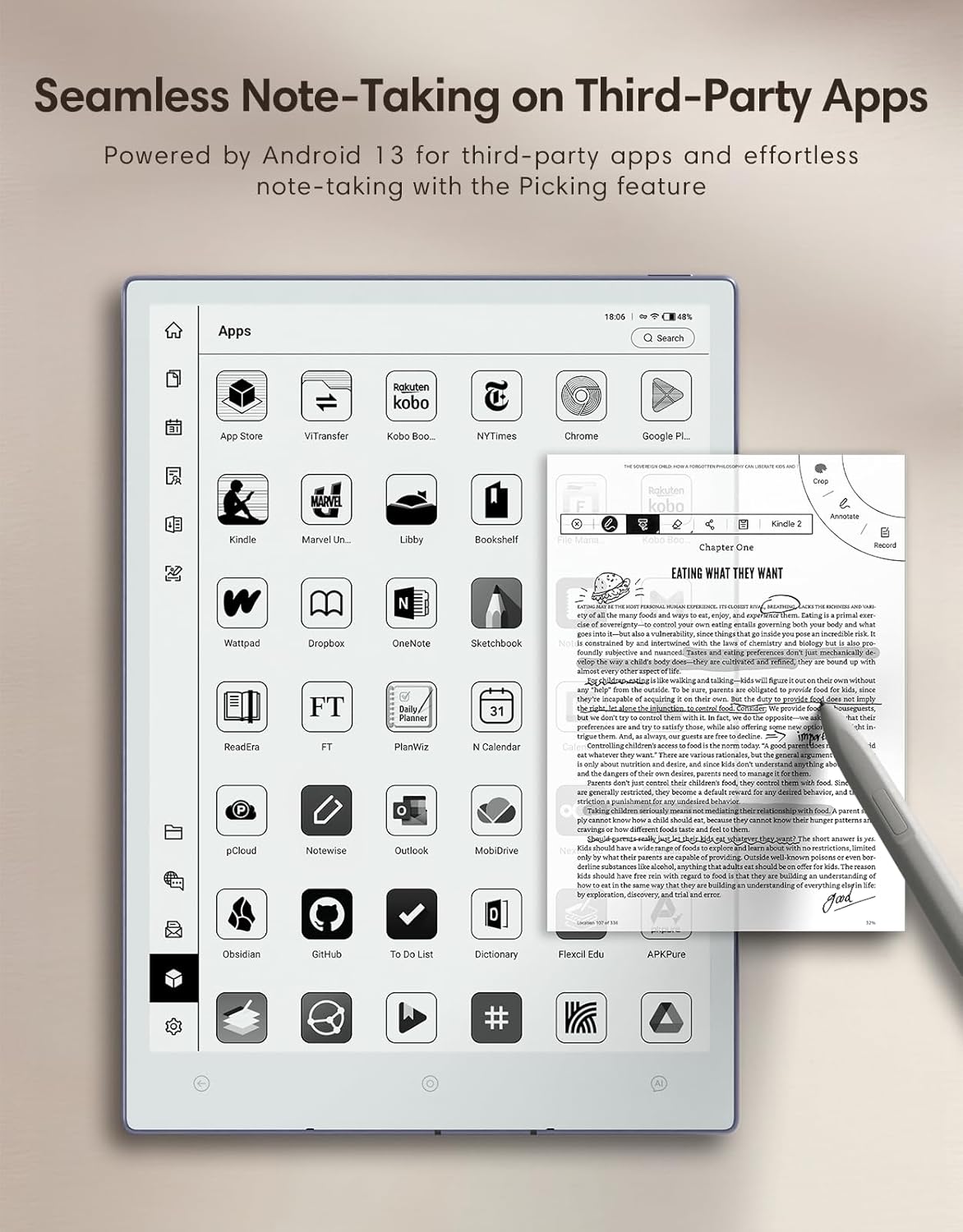
Yes. Before acessing Google Play Store and related apps, please go to Setings > Play Store and enable Google Service, Complete the authorization process as prompted the first time.
Can files on AiPaper be backed up automatically?
Yes. Open the AiPaper File from the left menu on the homepage, then log in to your OneDrive, Dropbox,or Google Drive to sync and back up files.
Automatic backups can be set for every 24 hours, 3 days, or 7 days.
Why is the page-turning speed slower than other tablets like ipad?
E-ink screens naturally respond slower than LCD screens. AiPaper, with its Octa-core 2.0GHz processor is the fastest among e-ink tablets.
To boost speed, select Fast or Ultra-fast Mode. Note: These modes may increase ghosting
How to clear ghosting?
Ghosting can be cleared with a quick gesture or by tapping the quick menu button.
1.Swipe down with three fingers from the top left of the AiPaper.
2.Swipe down with one finger from the top right to open the quick menu and tap “Refresh.”
Does AiPaper have a front light?
To better mimic the experience of writing and reading on paper, AiPaper dos not have a front light, while the AiPaper Mini is equipped with a front ight
WHAT’S IN THE BOX: The box includes an 10.65” AiPaper e-ink tablet, a folio cover, upgraded W2 stylus Pro, and 5 spare tips
ADVANCED CARTA 1300 MOBIUS SCREEN TECHNOLOGY: The enhanced Carta 1300 Mobius Screen offers improved contrast and exceptional clarity for a vibrant visual experience. Enjoy quicker response and reduced power consumption for smoother reading and writing
UNPARALLELED PAPER-LIKE WRITING AND READING: The 750 µm pen-to-ink distance ensures minimal barrier to the surface. The realistic textured feel mimics a pen-and-paper experience, making AiPaper digital notepad stand out from other tablets with slick glass screens
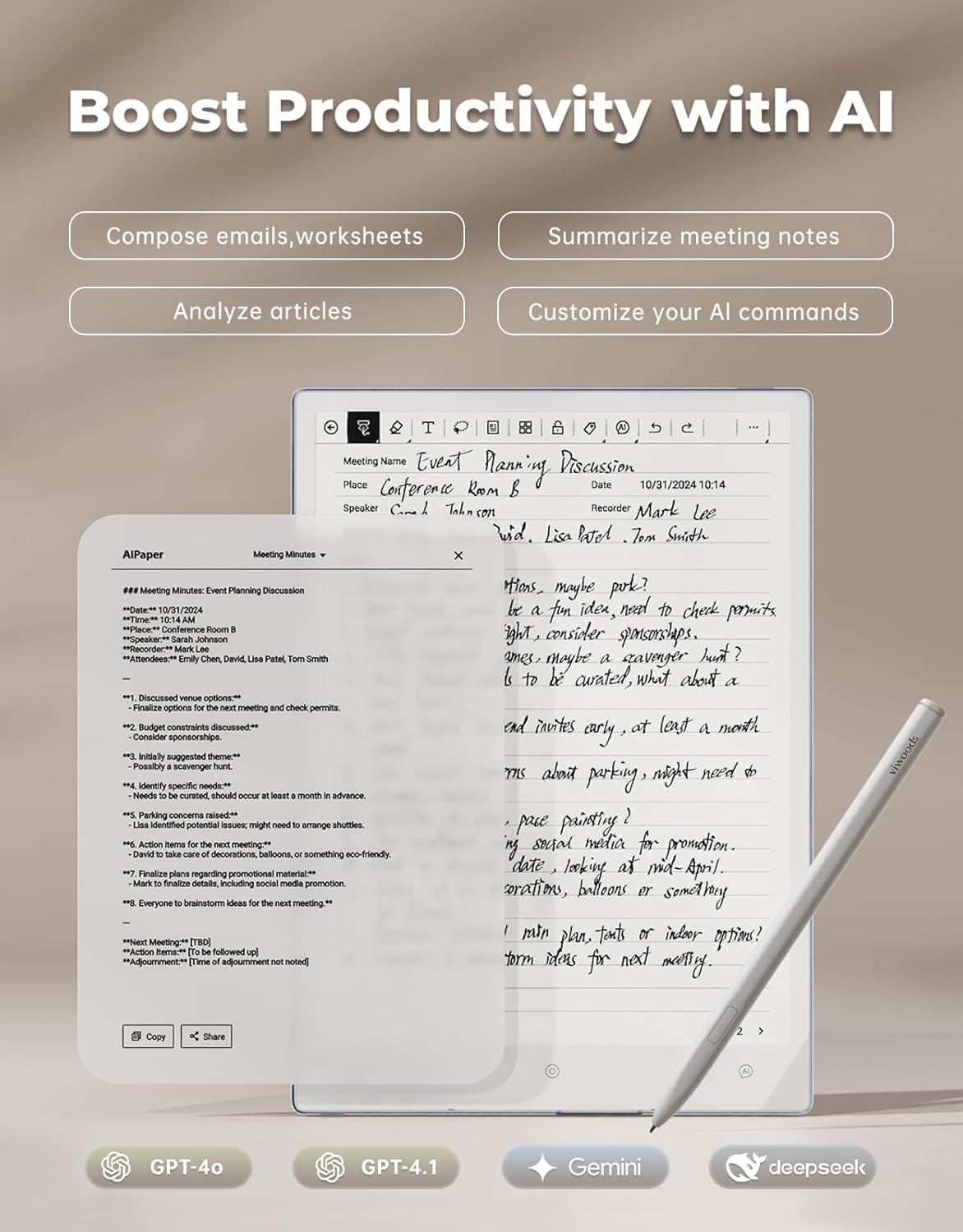
ELEVATE YOUR WORKS WITH AI: An efficient way to summarize, organize, and analyze your notes. Designed to unleash your creativity, boost productivity
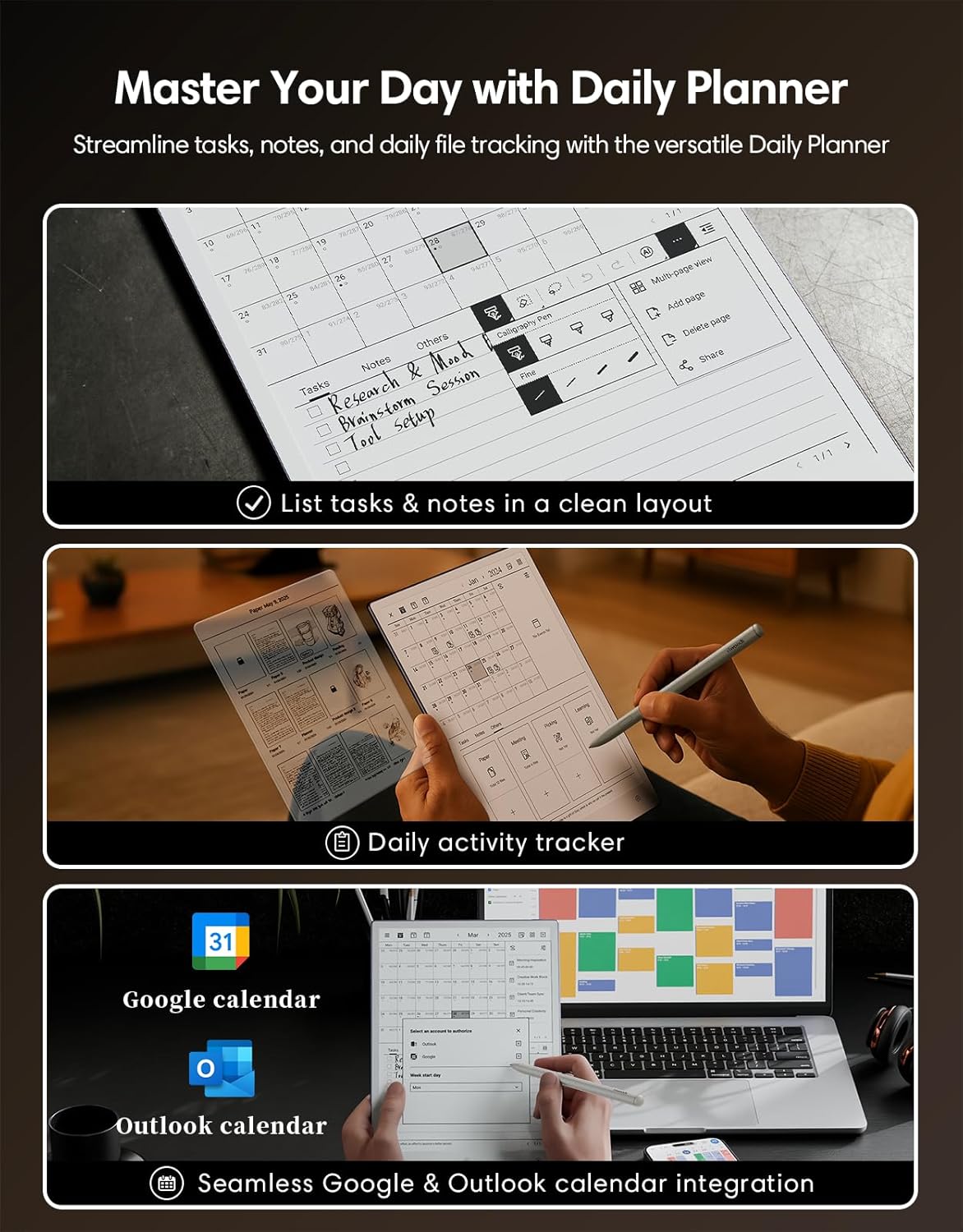
YOUR SMART DAILY PLANNER: AiPaper’s Daily feature keeps you organized and productive by combining task management, document tracking, and calendar integration. Plan your day with ease, automatically sort notes and activities by date, and sync with Google or Outlook calendars for a streamlined schedule. Perfect for work, study, or personal projects, it’s your ultimate tool for staying on top of everything
EFFORLESS FILE SYNC & SECURE SHARING: The Viwoods electronic notebook integrates with cloud platforms including OneDrive, Google Drive and Dropbox, enabling effortless file syncing and sharing. Transfer files securely via WLAN Transfer, Bluetooth, USB, or ViTransfer, ensuring your files are always accessible, synchronized, and secure
GREAT 300PPI CLARITY: Enjoy an eye-friendly reading experience with 300PPI and 2560×1920 resolution. Read ebooks on electronic notebook comfortably for hours without backlight, glare, or eye strain
BIG SCREEN, SLIM, LIGHT: AiPaper paper tablet combines portability with a spacious 10.65″ screen, offering ample space for writing and drawing. It’s lightweight and perfect for travel at just 4.5 mm thick and weighing only 370g
128GB LARGE STORAGE WITHOUT SUBSCRIPTION FEE: With 128GB storage, AiPaper can hold up to 20,000 books or 2,400,000 pages of notes without any subscription fees
QUICK RESPONSE: AiPaper features a powerful octa-core 2.0 GHz MT8788 processor, which is more robust than those of competitors. You’ll experience minimal lag when flipping pages, loading large documents, or quickly switching tools
7 reviews for Upgraded Bundle with AiPaper, Stylus Pro and 5 Nibs, Carta 1300 AI E Ink Tablet, 10.65” 300PPI Electronic Notebook with Pen, Ultra-Thin 4.5mm, Lightweight 370g, 128GB Note-Taking Device
Add a review

$113.99
Jamie Sutphin –
Very satisfied, mulitiple use cases on e-ink
After researching various e-tablet makers and products, watching at least a dozen or more YT reviews and comparisons, I was ready to finally try e-ink. Many reviewers (various brands) I saw featured comic strips, ghosting issues prominently – but wait, for me at least, at 600$ who buys this to read comic books? My use case is more hard-core professional software and cloud engineer. It has to be useful and many use cases. So their reviews I thought didn’t make sense. But I decided to keep researching, at first I thought I was leaning towards Boox – however the pricing and the add-on purchases didn’t compare to the value the Viwoods brings. For this price, I think you get a great stylus with lots of nibs, and the tablet and writing experience is fantanstic for what I do – take notes, draw software and infrastructure diagrams, draw building plans (for home improvement DYI projects). The icing on the cake was the Android and Google Play integration, I had not seen anyone going in depth about using some of my daily apps – Yahoo finance, online technical libraries, gmail, cloud storage, magazine subscriptions- in short multi-tasking when I needed to. Now I can work outside in the sun and less time behind my desk, I carry this around everywhere and keeps me focused. Battery life is very good too I find for me I can work on it regularly and the charge lasts almost a whole week. I use chatgpt fairly often to prototype stuff, so the Ai button is nice but only has 4.0 support not the latest openai 5 model, but I still use the Ai button some. The handwriting recognition is “meh” because my writing is too fast and a bit sloppy, so I use it less. I find When I want Chatgpt 5 I just go to the chrome browser and work in there as usual. Finally, the Android upgrades keep coming! It’s patched and updated more often than a Windows OS, so my verdict – top of the list recommendation for anyone who needs more than just sketching or drawing and needs cloud integration to get the most use and best value for money. I’ve learned how to use the notes and “Picking” whch took a minute to figure out, but is easy and not too complicated. I wanted somehing that was not overly complicated, and could sync to my google and integrate to cloud. I’m always bouncing between laptop and this, I like the Google play support i can upload code to my “git” via the android git client and continue to work on it on my laptop seamlessly. The only “meh” I would have is minor, I admint, but the name is just.. a little strange -“viwoods”, really? How do you even pronouce it, or come up with such a name? I dunno, but the I do admit I was suspicious at first just because of the name is just … weird. But now, I know the product and it is really a very useful e-ink tablet at fair price.
Meagan Rose –
An E-Ink Device That Replaces Everything Else
I absolutely love my AiPaper. It’s completely replaced all my other devices and even paper and pencil for both work and personal use. I use it for everything—taking notes for work, journaling, reading comics on Marvel Unlimited and Shonen Jump, and even catching up on articles from the web. It’s also been fantastic for reading epubs in KOReader, which works seamlessly on this device.One of the standout aspects of the AiPaper is its exceptional customer service. The stylus I initially received had an issue with the nibs falling out. I reached out to customer service, and they immediately sent me a replacement stylus, which arrived in just two days and worked perfectly. Their quick response and attention to customer satisfaction made a lasting impression.The bundle that comes with the AiPaper is also a huge plus. It includes a high-quality leather or faux leather half folio case, the stylus, and 14 nibs (12 in the box and 2 cleverly stored in the side of the case). Everything feels premium and well thought out, adding to the overall value of the device.Another reason I chose the AiPaper over other brand’s devices is the dedication of the development team. They consistently roll out updates (scheduled for at least one a month from Sept-Dec 2024, and have done about two times that so far) and are highly responsive to feature requests, which gives me confidence in the long-term potential of this device. I can see a strong community forming around such a well-supported product, and that’s something I’m excited to be a part of.The hardware is equally impressive. The 4100mAh battery lasts much longer than most other devices in this category, yet the device itself is incredibly lightweight—just 370g, which is even lighter than my phone! It’s perfect for extended use without feeling heavy or cumbersome.The Carta 1300 screen at 300 PPI was the final selling point for me. While many brands are chasing color displays, I was looking for a solid black-and-white device, and this screen is exactly that: bright, crisp, and incredibly clear.In short, the AiPaper has become my go-to device for everything: work, reading, journaling, and more. It checks all the boxes—top-notch customer service, a high-quality bundle, a dedicated development team, exceptional battery life, lightweight design, and a stunning monochrome display. I really couldn’t ask for more. Highly recommended!
Del –
Great tablet but needs frontlight
The tablet is really good with a few smaller issues with software which they are improving. Needs a front light. I understand the writing and reading experience is better with less layers bringing screen closer but for me lack of front light is a non starter. Did not fully know this until I did not have a light. My Kindle has a glow light so miss that.The writing and reading were very good but would give up some of that for the light. Also getting docs onto and off a clunky system compared to competition from Boox, remarkable and others are easier. I will say they have been good with updates to fix and enhance the device. They are regular with those. ‘The pen is good with a really nice eraser experience. The carta 1300 screen is very good as well when lighting is good.
GHAF 108 –
Flickering screen, Bad Unit: Returning it
Very clean product, gave it to my Son for his music teaching for this years graduation however after the initial first few days of trying to work thru all the apps and instructions and practice using the devise…it was notable that the screen would flicker and lock up…I tried reaching out to the company but not able to get an answer to the issue as well as you rest your hand on the devise the three action buttons along the edge are activated (you can turn the buttons off in the setup) but it’s super inconvenient turn the buttons on when you need to use themUltimately the unit may habe been defective I was unable to work on it for more than 20 sec without the screen flashing on and off and going to the start home page…I continued to try to find answers but no luck I’m sad to have been excited for this purchase and now I’m returning it in homes to do more research and find out if my unit was a fluke or are others having the same problem?
Robert Li –
If you ever wanted a Remarkable that used Android and freely exchangeable EMR styli this is exactly it. The AI integrations are perfectly fine, I find the audio recording functionality incredibly useful. You can create custom templates in something like Claude and upload them reasonably easily. Highly recommend if you plan on using this is a professional setting.
Siew Lee –
I’ve waited for years for a product like this. I still have papers in a box from the last 12 months where I jotted my notes that I need to sort through. This Viwoods now keeps everything in one place digitised. I particularly love the layout where I know where my tasks are, where to find meeting notes and where I’ve committed to people and where my brainstorming ideas are. I love the AI buttons. Imagine collapsing several steps – opening laptop/phone, launch browser, type question and determine best answers – into one? I’ve asked questions like- compare market capitalisation of company A and B- explain the difference between cabinet, inner and outer ministry in Australiaand bam! I got my answers within 5 seconds.I have a few ask- colour version- easier to work on documents on drives right away (this one possibly due to inexperience)
Byron Cochrane –
A quality made item with loads of functionality. But, the basics don’t work! It does everything the advertisement says- just not well or usable.The good:1. Paper feel is pretty good. Not as good as Remarkable but close.2. Has access to apps like Teams, Notes.3. Can link pages to calendar.The bad.:1. Ai generated content cannot be pasted. It shows that it’s copied but pasting does not work. It will paste the last thing you copied from other pages.2. Handwriting to text produces so many mistakes it’s not worth doing. Sure my handwriting is not great but even when purposely neat the result is just poor.3. Interactive handwriting to text just doesn’t produce anything useful.4. There’s also a quirky function of ChatGPT. If you ask for text conversion you get nonsense. If you ask for evaluation you get an almost perfect outcome. But it’s evaluated and therefore changed so not quite what you wrote so there’s something amiss in how Ai is interpreted the source.Summary.Good if you want it just to capture notes and calendar entries. But sharing is only done via pdf or png image so it can’t edited. This is why the conversion to text and Ai paste of text is so important- so it can be edited elsewhere.I think in later versions all this will be fixed. Currently v3.7 has the above limitations. I sent mine back and will try again when they get to v4.7.