

MoesGo WiFi Smart Wall Light Switch,Glass Panel, Multi-Control(3 Way), 2.4GHz Wi-Fi Touch Switches, Neutral Wire Required, Remote Control Smart Life/Tuya App, Work with Alexa, Google Home White 2 Gang
$19.99
Related Products





From the brand


MoesGo is a professional smart home brand. Although we are young, MoesGo strives to provided rich variety of smart home devices to make your home more automated, safer and cleaner.
The MoesGo smart home devices can raise your home’s IQ. Smart homes allow you to have greater control of your energy use.
Let’s go towards Smart Age together!
MoesGo Best Sellers
Smart Life, Smart Future

Product Dimensions : 4.72 x 2.91 x 1.5 inches; 8.78 ounces
Item model number : 001
Date First Available : May 13, 2020
Manufacturer : WENZHOU NOVA NEW ENERGY CO.,LTD
ASIN : B088JZKX56
Best Sellers Rank: #37,689 in Tools & Home Improvement (See Top 100 in Tools & Home Improvement) #154 in Electrical Light Switches
Customer Reviews: 4.4 4.4 out of 5 stars 1,390 ratings var dpAcrHasRegisteredArcLinkClickAction; P.when(‘A’, ‘ready’).execute(function(A) { if (dpAcrHasRegisteredArcLinkClickAction !== true) { dpAcrHasRegisteredArcLinkClickAction = true; A.declarative( ‘acrLink-click-metrics’, ‘click’, { “allowLinkDefault”: true }, function (event) { if (window.ue) { ue.count(“acrLinkClickCount”, (ue.count(“acrLinkClickCount”) || 0) + 1); } } ); } }); P.when(‘A’, ‘cf’).execute(function(A) { A.declarative(‘acrStarsLink-click-metrics’, ‘click’, { “allowLinkDefault” : true }, function(event){ if(window.ue) { ue.count(“acrStarsLinkWithPopoverClickCount”, (ue.count(“acrStarsLinkWithPopoverClickCount”) || 0) + 1); } }); });
【Attention】Neutral wire required/ Only support 2.4GHz WiFi/ Install without power;setting relay status and remembers last relay status optional when powered off , backlight switch On/Off.
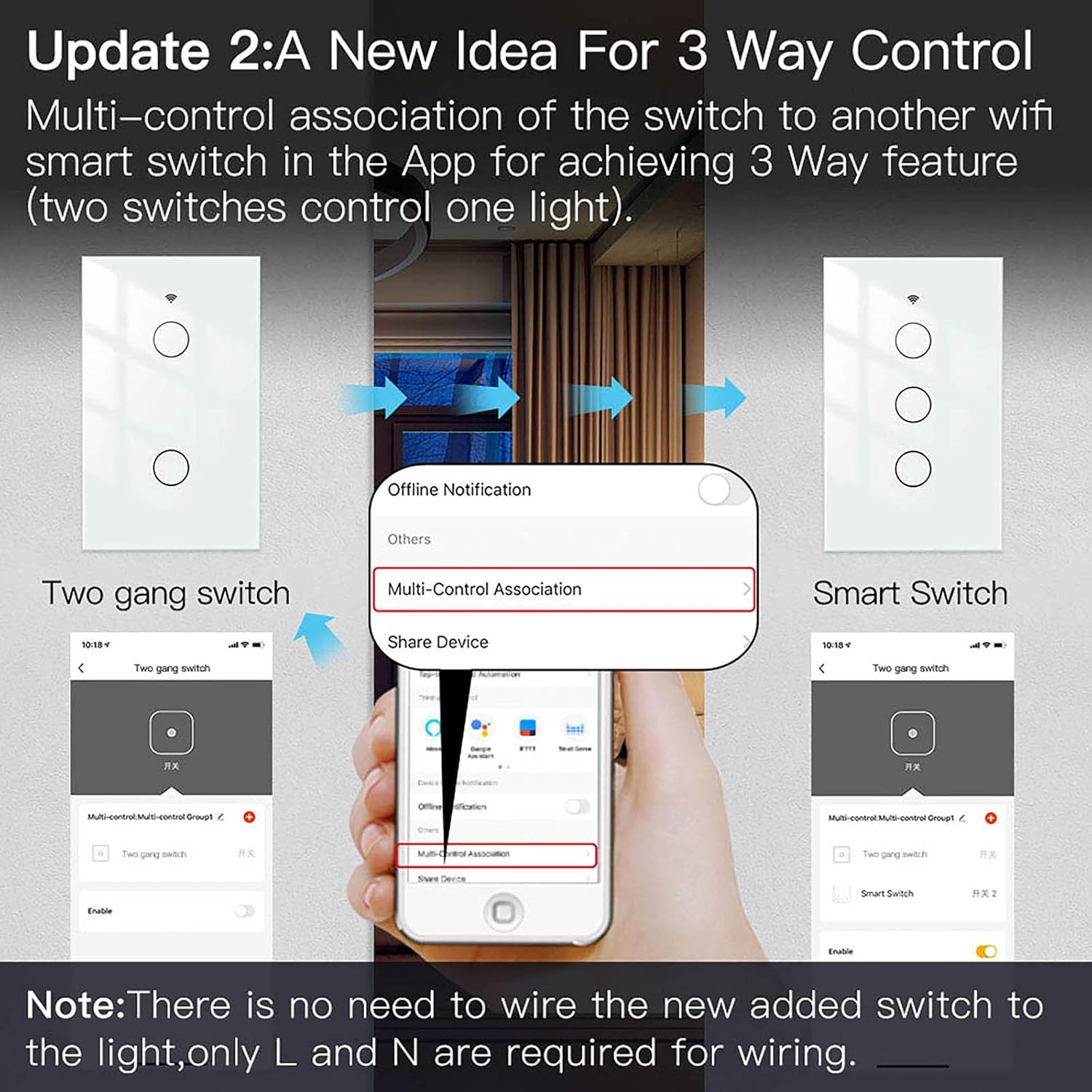
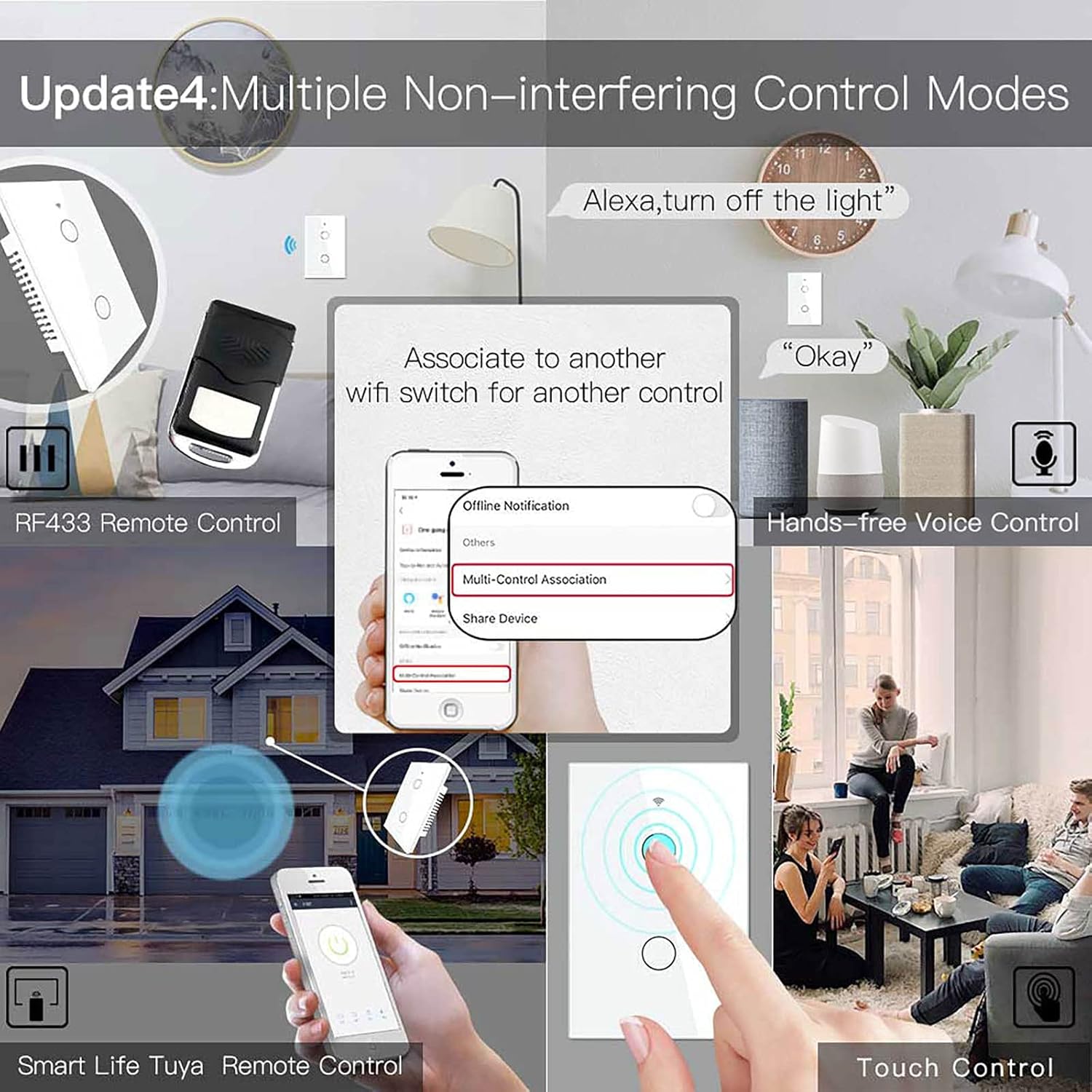
【A New Idea For 3 Way Control】 Not only as single pole, but also can multi-control. Multiple switches control 1 light.
【Control from Anywhere】No matter when or where you can control your light on and off with your phone. “Smart Life” APP let you no more worrying about forgetting to turn off the lights.
【Hands-Free Voice Control】Compatible with Alexa and Google Home for hands-free voice control. Enjoy smart and convenient life.
【Scheduling】Use timer or countdown schedules to set your smart switch to automatically turn on and off while you’re home or away.
13 reviews for MoesGo WiFi Smart Wall Light Switch,Glass Panel, Multi-Control(3 Way), 2.4GHz Wi-Fi Touch Switches, Neutral Wire Required, Remote Control Smart Life/Tuya App, Work with Alexa, Google Home White 2 Gang
Add a review

$19.99
Alastair G. Stell –
Surprisingly easy to install and no fuss to configure and use
My goal was to replace a set of existing light-and-fan switches. I needed 2-gang (dual switch) in order to control the light and fan separately. The first 2-gang switch was at the front door, the second at the opposite end of the room – a very typical household configuration.The problem I was trying to solve was the need to move one of the 2-gang switches closer to a utility washbasin. I was concerned an occasional splash of water might reach the relocated switch, so I figure using a touch switch would be a smart solution – inherently able to shrug off water and easy to seal up the edges since there are no moving parts. Okay, still with me?This touch switch is NOT a drop in replacement for a traditional 2-gang, 3-way switch. A sketch will help (see diagram). Please note I am only showing control for a single device (1-gang) but if you want separate control of the fan and light you will need 2-gang switches.A typical configuration is shown under the ‘traditional’ label. As shown the light is ‘on’. move either switch and the light is ‘off’. Move either switch again and the light turns back ‘on’. Simple stuff, right?Well the MoesGo solution is even simpler. Referring to the diagram, only ONE of the MoesGo switches, the Primary, actually controls the light. The other switches are configured to communicate across your home wi-fi network to control the Primary (which in the diagram is MoesGo Switch 2). Note that BOTH switches must have a LIVE and a NEUTRAL connection to power the electronics. Note also, you must be comfortable loading the MOES app onto your phone because otherwise you cannot configure the second switch (MoesGo Switch 1) to control the Primary.I can imagine the change in configuration confuses some people although the actual instructions included with the switches are easy to follow (at least in my opinion). Surprisingly well written!One nice feature of this solution is that you can get the primary working immediately and without the phone App. However if you want to use voice control and/or configure multiple switches to control the same light, then you must download the App and you must configure the switches from this App.Now onto other items:- you cannot operate a 3 way setup using a mix of MoesGo and conventional switches. This would not end well!- you must have a home wi-fi setup that supports 2.4GHz operation. This switch is strictly 2.4G. During configuration from the phone, you are typically using Bluetooth to talk to the new switch, and during the setup process you will give the switch the name and password for the 2.4G link. I strongly recommend you temporarily switch your phone to the 2.4G link too. Once the switch is configured you can revert to 5G.- the switch uses a conventional, mechanical relay. Be careful not to exceed the rated current for this device or, again, things will not go well for you!I also taught Alexa to recognize and use these switches. So I can say something like ‘Alexa, turn on the Utility Room Light’ and sure enough the light comes on! Same goes for the fan.I’ve installed many IoT devices so I am now very comfortable doing so. However, I must say these switches are exceptionally easy to install and configure, and the instructions are well written, unambiguous and clear. So for me this was a great experience and intend to buy more of these lights. In particular, I am keen to try out the timer function (although Alexa actually has the same capability).
Angel Arias –
Moesgo
The item arrived on time and works 100%.It looks sturdy, just like the photo and description.
Alain –
Good product
They work fine. Not like the ones that does not require neutral wire from this brand, they do not work correctly, I purchased first this but did not get refunf, then I bought the ones that require neutral wire and they are working great.
Diego Gonzalez –
Todos menos uno
Son excelentes. Facil de configurar por su app. La instalación es relativamente sencilla, para el que es promedio haciendo instalaciones, en mi caso busque un electricista. Cambie toda mi casa a estos interruptores. Le doy 4, porque aprovechando este, que estaba usado, salió dañado
Rafael Ruiz –
Everything was easy
easy to install, easy to set up, standard size, it works with its own app (MOES), it works with Alexa
Amazon Customer –
Nice Looking Smart Switch, Easy to Install
EDIT: I wish they would let me review the different gangs but I won’t so I’ll have to add to my previous one. Having installed the single pole, one gang switch was ease, I wanted to try and do a 2 gang one with a three way switch. THIS IS NOT A THREE WAY SWITCH, even though it says it :(I ended up having to use this on a different location which was simple enough to install as well. I ended up getting the Kasa brand smart switch for a three way switch (also very easy to install). I have included a picture of the set up so you can see how it only goes out to each light (or whatever you have connected to it).I am not a very handy person and I was able to install this smart switch on my own! I watched a couple of YouTube videos to make sure I had the right idea. When I removed my old switch, I only had the black wire so I figured out that I needed to add in a small white wire to complete the neutral line as this smart switch does not come with wires. After a quick trip to the store, I was in business!! Pairing to the app and to my Alexa was super easy as well!! Definitely worth the money for how nice it looks and how easy it was to set up…and how well it’s working so far!!
Claymore letifer –
Not Recommended for most homes
I bought this switch to control my front porch lights and the light inside my front door (3 pole). Mostly I wanted my porch lights to turn during the day (using the timer on the smart life app) and the light in the hallway behind the front door to turn on at night. The problem is that my house doesn’t have a hard-wired light in the hallway, but a hanging lamp plugged into an outlet. I tried to follow the instructions that came with it (which are horribly written). but all my lights flashed and I couldn’t turn them on or off even once the switch was added to smart life. contacted support which replied back very quickly but clearly didn’t read my question as they just told me to make sure I followed my instructions. after spending about 4 hours looking as similar lights (seem many companies make this exact same light) i noticed that all of them where installing the capacitor (which i have never seen needed for a switch before) at the bulb, and not at the switch. looking that horrible instructions wiring diagram it could mean to do that but it says in the text to do it at the switch. so had to disable my lights and it still just made all the lights flash and the switch didn’t work. finally after email the company 3 times they tell me that you can’t have an outlet on the switch. So I figured I would then just not use one of the buttons and install and standard switch on the outlet. But guess what this thing is to bit to do that with a standard box. So this thing was useless for me. I would not recommend getting this if like me you live in a house where the lights are on the same switch as an outlet. they really should put more techinal information in the discripesction. if I had known that these things couldn’t take more than 2Amps i would have never bought them.
Nestor Colmenares –
Easy to install
Excellent really efficient
Lorenzo –
Bueno!
Patricia M. –
No issues with product or seller
José e. –
Al principio no se conectaba asta que le desconecte la corriente y se la conecte nuevamente y rapidísimo se conecto a smartlive y ya puse manejarlo con la app la instalación es fácil y lo que me gustó que la app reconoce cada apagador independiente para controlarlo el cableado es fácil solo nesesita neutro más no tierra física si su chalupa está muy ensima de la pared le recomiendo ponerle un aumento que será una caja universal para chalupa y con eso queda perfecto ya que el apagador mide aproximadamente 4 CM de ancho y con el cableado habeses no cabe en la chalupa ….
Edgar Heriberto Pérez Garza –
4 Estrellas por la configuración.No es difícil de conectar, y si necesita cable Neutro. funciona rápidamente y al momento de oprimir sin retraso, de igual manera con la APP, puedes programar luces cuales quieras encendido y apagado. En mi caso instalé 7 apagadores (1, 2 y 3 gans). Ventaja que son 3 vías.Lo que se me dificultó y no vi en el manual es como resetear el apagador, ya que en la primer configuración no lo reconocía en la APP Smart Life, oprimes el primer botón de encendido 5 veces seguidas y una sexta vez lo dejas oprimido entre 5 y 10 segundos para resetearlo, de esta manera puedes enlazarlo nuevamente a la aplicación. (intenté desconectarlo del a fase y conectarlo nuevamente y oprimir 6 veces el primer botón funcionó)
Daniel Guevara –
Como dice en las especificaciones, requiere cable neutro, yo contrate mejor un eléctrico para que lo instalara bien. Un poco complicado para que lo detectara la app, la qué usé fue Tuya. Lo tengo agregado en alexa y funciona a la perfección, además una gran infinidad de automatizaciones te ayudan a sacarle mejor provecho. Muy buen producto, altamente recomendado