

Lux TQ1 Smart Thermostat for Home, Programmable WiFi with Matter Protocol for Temperature Control, C-Wire or Power Bridge Required – Works with Apple Home and Google Home – termostato inteligente wifi
$8.99
Related Products





Product description

 Save On Your Energy Bill
Save money with efficient smart features. Save up to $130 per year with reduced energy costs.
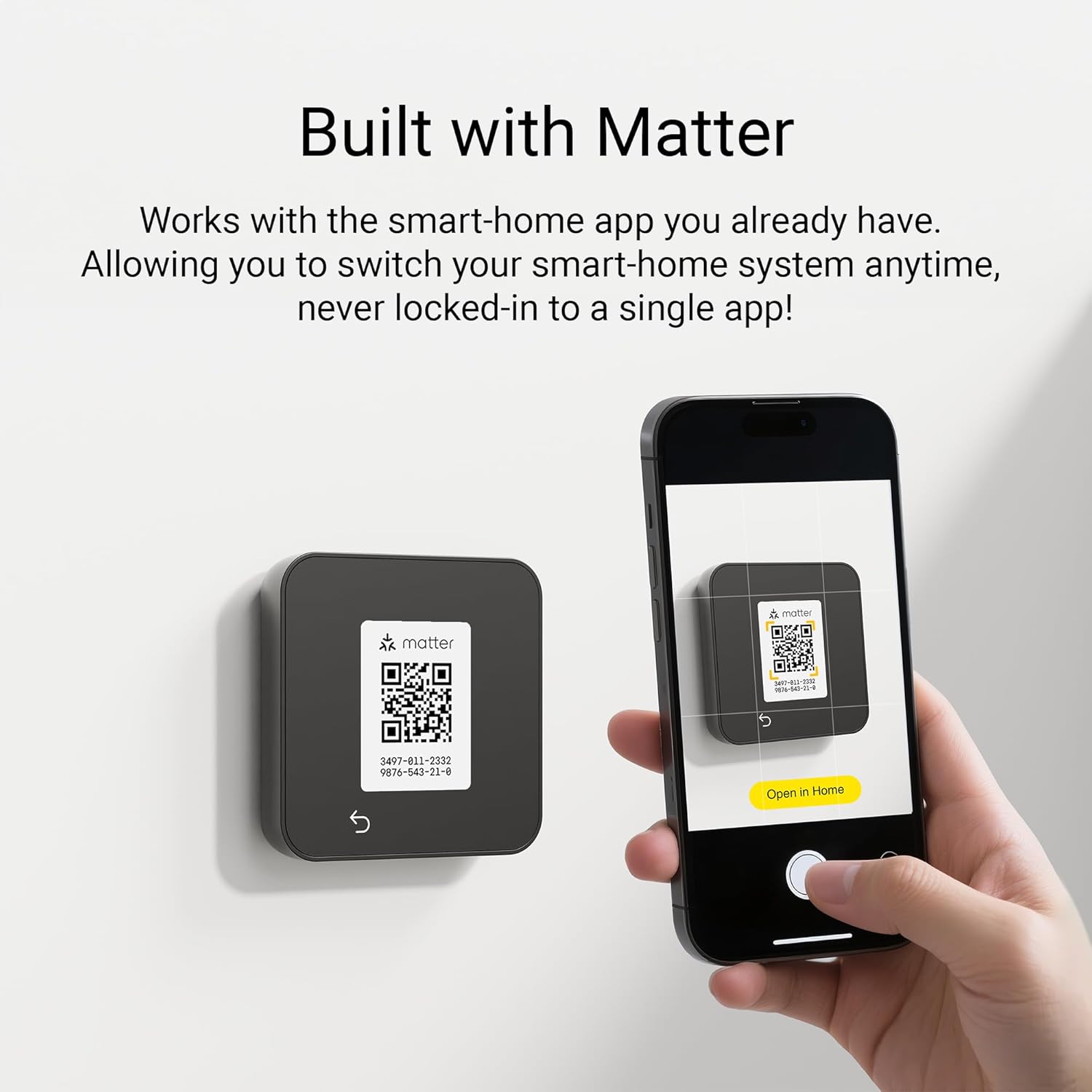
 Built with Matter
Works with your existing smart-home app. Switch system anytime, never locked-in to a single app!
 Seamless Remote Control
Setup and change schedule, turn on and off anytime anywhere in the app.
 Voice Control
Connects through existing smart speaker or Matter controller to adjust the temperature by voice.
1 Effortless Save
2 Built with Matter
3 Remote Control
4 Voice Control
The video showcases the product in use.The video guides you through product setup.The video compares multiple products.The video shows the product being unpacked. Installation instructional vid Merchant Video
 Easy to Use
All system configuration done at device, no app required.
 Works with Most HVAC Systems
Compatible with most 24V systems, including conventional, PTAC, heat pump and fan coil.
 Create Your Own Schedule
Customize a 7-day schedule to fit your lifestyle — stored locally for reliable performance.
 Keypad Lockout
Secure your settings with a numeric PIN code to prevent unauthorized changes.
1 Easy to Use
2 Compatibility
3 Create Schedule
4 Keypad Lockout
Discover the Fit for Your Home and Needs
Add to Cart
Add to Cart
Add to Cart
Add to Cart
Add to Cart
Add to Cart
Customer Reviews
3.9 out of 5 stars 17
3.9 out of 5 stars 17
4.6 out of 5 stars 11
4.0 out of 5 stars 66
—
—
Price
$66.49$66.49
$66.49$66.49
$125.99$125.99
$16.09$16.09
$14.99$14.99
$14.99$14.99
Built with Matter
Matter over WiFi
Matter over WiFi
Matter over WiFi
N/A
N/A
N/A
Annual Savings
Save up to $130 per year
Save up to $130 per year
Save up to $130 per year
N/A
N/A
N/A
Color
Black
White
Premium black glass
White
Black
White
Control local & remote
with smart-home system app
with smart-home system app
with smart-home system app
N/A
N/A
N/A
Compatible with smart sensor
Not compatible
Not compatible
Compatible full house comfort
N/A
N/A
N/A
Scheduling
Create your own schedule
Create your own schedule
Auto-By learning your routine
N/A
N/A
N/A
Occupancy detection
No
No
Yes
N/A
N/A
N/A
Humidity sensor
No
No
Yes
N/A
N/A
N/A
Auto display wake & brightness
User Set display brightness
User Set display brightness
When people are nearby
N/A
N/A
N/A
Keypad lock-out
With PIN Code
With PIN Code
With PIN Code
N/A
N/A
N/A
HVAC System Compatibility
3H2C + PTAC + FC
3H2C + PTAC + FC
up to 4H2C + PTAC + FC + 2 Aux
24VAC systems
Compatible with TQ1 Model
Compatible with TQ1 Model
Included in Box
Bridge, Plate Sold Separately
Bridge, Plate Sold Separately
1 Sensor, Power Bridge, Plate
Sold Separately for TQ1
Sold Separately for TQ1
Sold Separately for TQ1
The TQ1 Smart Thermostat is the easiest to use connected thermostat. It connects directly with your smart-speaker allowing local and remote control via your existing smart-home app. Use of the Matter IoT protocol means you are never locked-in to a single App, simply change your smart-speaker to change your smart-home
All system configuration done at device, no app required powered by the Matter protocol. Everything works with the smart-home app already on your phone, no new accounts or apps to download
Use the Apple Home, Google Home, Alexa or SmartThings App to set-up the TQ1 in seconds. A smart speaker or Matter controller is required for connectivity outside the home.
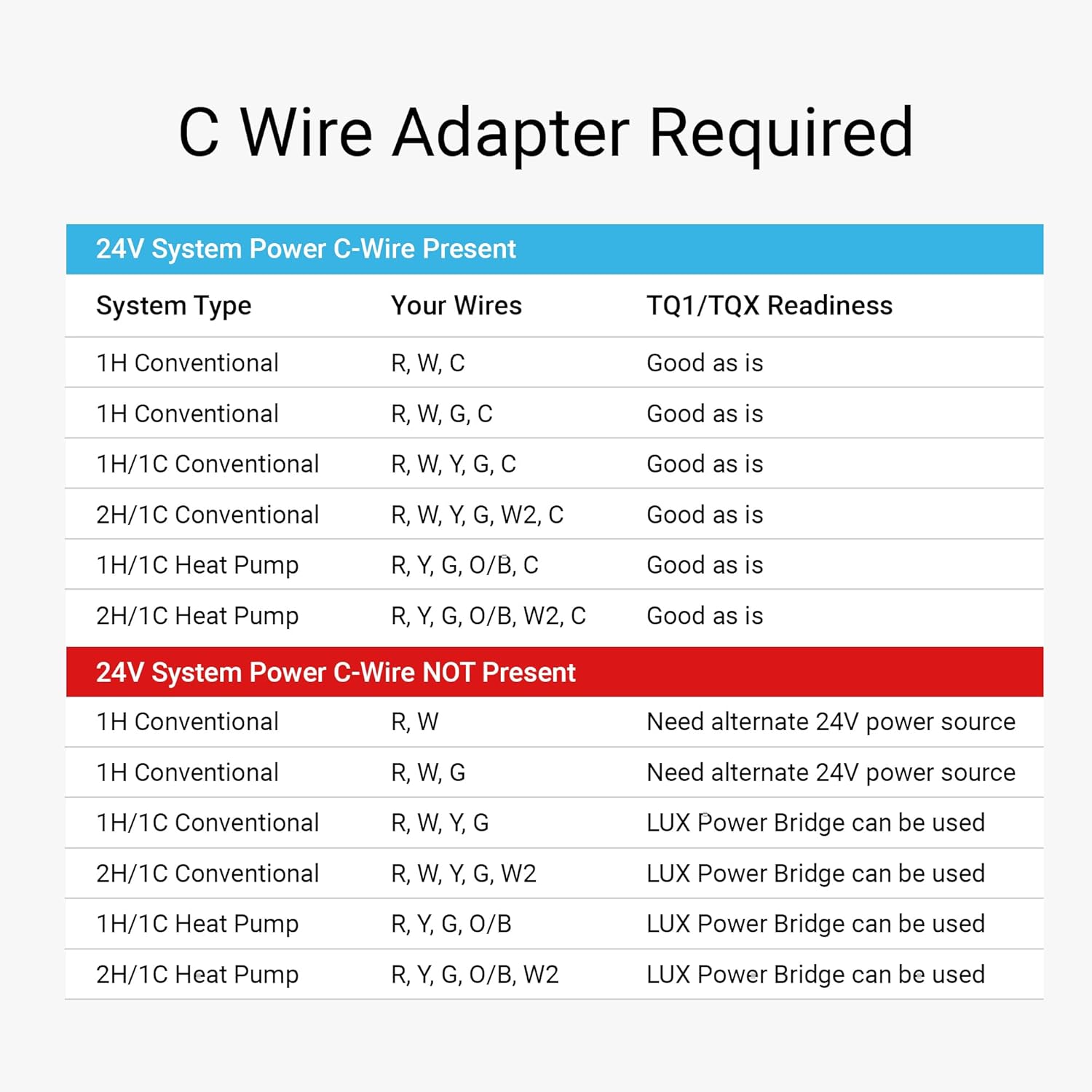
C-Wire Adapter and Trim Plates sold separately
System Compatibility: Conventional: Up to 2 heat, 2 cool, Heat pump: Up to 3 heat, 2 cool, PTAC: Conventional or Heat pump, Fan coil: Binary output 2-pipe or 4-pipe, Millivolt heating, Not compatible with 120V/240V line voltage systems
6 reviews for Lux TQ1 Smart Thermostat for Home, Programmable WiFi with Matter Protocol for Temperature Control, C-Wire or Power Bridge Required – Works with Apple Home and Google Home – termostato inteligente wifi
Add a review

$8.99
Caroline Baker –
Fantastic Smart Thermostat — Easy Setup, Great Control, and Future-Proof with Matter!
I couldn’t be happier with the Lux TQ1 Smart Digital Thermostat! Setup was incredibly simple — it connected to WiFi within minutes, and the Matter protocol makes it fully compatible with all my smart home devices, including Alexa and Apple Home. The touchscreen is bright and responsive, and I love how easy it is to customize schedules to keep my home comfortable while saving energy.The app is intuitive, allowing me to adjust temperatures remotely and view energy usage insights. It also looks sleek on the wall — minimalist but high-tech. What really stands out is how responsive it is; temperature adjustments take effect immediately.If you’re looking for a modern, efficient, and reliable smart thermostat that’s built for the future of home automation, the Lux TQ1 is an excellent choice.
Chris Tian –
Easy to install, connect and setup. Very pleased.
We decided to switch out our google nest (it’s brand new but malfunctioning!). The AC keeps blowing air when room temp is lower than the scheduled eco mode, which is super annoying. Decide to give this a try, super easy to install, and connect with my Alexa. I haven’t had temperature issue with the new thermostat which we are pleased. We also like it’s easier to change temperature in the thermostat itself(compared to google neat’s touch bar) – easier for my parents to use too!
Discover-It! –
It works, BUT has a 4-6F Degree discrepancy from TWO separate thermometers when screen is on.
I always wanted a Smart Thermostat but until very recently they were cost prohibitive as in not being totally worth the utility for me. Nest ranged between $150-300 depending on how advanced the unit was and Honeywell and others were just the old models with pretty much very rudimentary interfaces.For $94, this unit featured advanced controls with several unit types and more important, Matter Integration, so it wasn’t limited to a single “automation environment” so it’ll work with Google Home, Gemini, Siri, Alexa and many other automation protocols through the Matter umbrella, that’s the Number 1 feature for me aside from being almost 40% cheaper than the cheapest Google Nest.Installation was as simple as it gets, instructions are well put and while i am very experienced with HVAC, Electric and overall Home Maintenance work, i feel pretty much anybody can do this, as long as they have a Common Wire available, and it’ll be most likely available in home built recently, if not, well you might get it done if you’re crafty enough, but if you don’t feel comfortable then you might need a technician, however that’s not the product’s fault.Everything works as intended, the screen is bright and easy to ready, and that may be part of the issue on why it lost a star, more about that in just a second.Connecting it to the App and integrating it to my integration protocol was as simple as it gets too, just like setting up a smart light or a smart lock, operation is quick and flawless and connection to my WiFi network was seamless.Now, the downside is that i felt that the AC unit was running A LOT more after i changed the Thermostat, i was wondering why and also felt that the house was feeling a little colder too at the same set temperature, i have a thermometer in the kitchen and one in the main bedroom and those always matched the thermostat or were off by no more than 1-2F when sitting in rooms different to the thermostat, so i brought one closer to the thermostat and there was a 4F difference between what was set and what the room temperature actually was, brought the other thermometer, same result.My conclusion is that by placing the hand over the screen when lit, it emits heat, NOT A LOT, but i assume that its enough to throw the measurements off, maybe they tested it in a lab and at certain specific temperatures in a controlled environment it was calibrated, but temperature is a tricky value, pressure, atmosphere and even humidity can affect heat retention inside a wall is the heat emitted is enough, i am not talking about thermal perception, but actual physics, so unfortunately it is not perfect, i am hoping that after some use it may have some learning, or software update, or that the sensor recalibrates, because that’s what the main functionality of a thermostat is, being as accurate as possible.Overall i like it aesthetically and functionally does everything i needed to do, the accuracy is an issue, maybe i got a lemon, i was debating myself between 3 and 4 stars but so far i like it and i hope Lux pushes an update to fix this issue.
AnitaVespa –
Easy to install, easy to use, won’t activate my compressor
This was very, very easy to install. The instructions are clear, and it was a breeze to hang on the wall because of the built-in level. It connected to my Wi-Fi, and I was able to scan a QR code with my phone to automatically connect to my Apple Home app. It’s easy to control from the unit and from the app. Sadly, it ends there. No matter what I did, despite turning on the AC through the unit, my compressor never turned on, and cold air never blew. I checked all of the wires and connections, and made sure everything was connected and turned on. Even my HVAC guys were confused. It’s not really worth much to me if it won’t control my unit. I’ve had to un-install it and re-install my original thermostat.
Christine –
My new LUX TQ1 Thermostat makes me feel at home!
This is a great upgrade to my house! I am not that experienced in being able to install a device like this, but it was simple with the clear instructions. I love the clean looking appearance this has on the wall. The screen is easy to read and adjusting the temperature warmer or cooler is very straightforward. I found this was so easy to setup and use with Alexa to make my house comfortable. I can even use the four digit pass code to keep my teenagers out of it!
tobycth3 –
Inaccurate temperature measurement, large swings in temperature
Had high hopes for a matter based thermostat to work with Home Assistant and be locally controlled. Build quality is a little flimsy but the install and setup was very easy. Connected without any issues to wifi and Home Assistant via matter protocol.However the temperature reading are wildly inaccurate. The screen being on heats up the thermostat and as a result reports temperatures 5° higher then they actually are. When the screen is off (or in night mode) the temperature gets a bit more accurate with a 0.5° to 1.5° difference but once you wake up the screen, it again returns to 5° higher or more.The wide range of offsets and infrequent updates causes huge temperature swings and makes it very uncomfortable and inconsistent. Setting the thermostat to cool to 75 will often result in overcooling to 72 or more, especially if you turned on the screen to adjust the setpoint.Sadly returning this one and going back to Nest.