
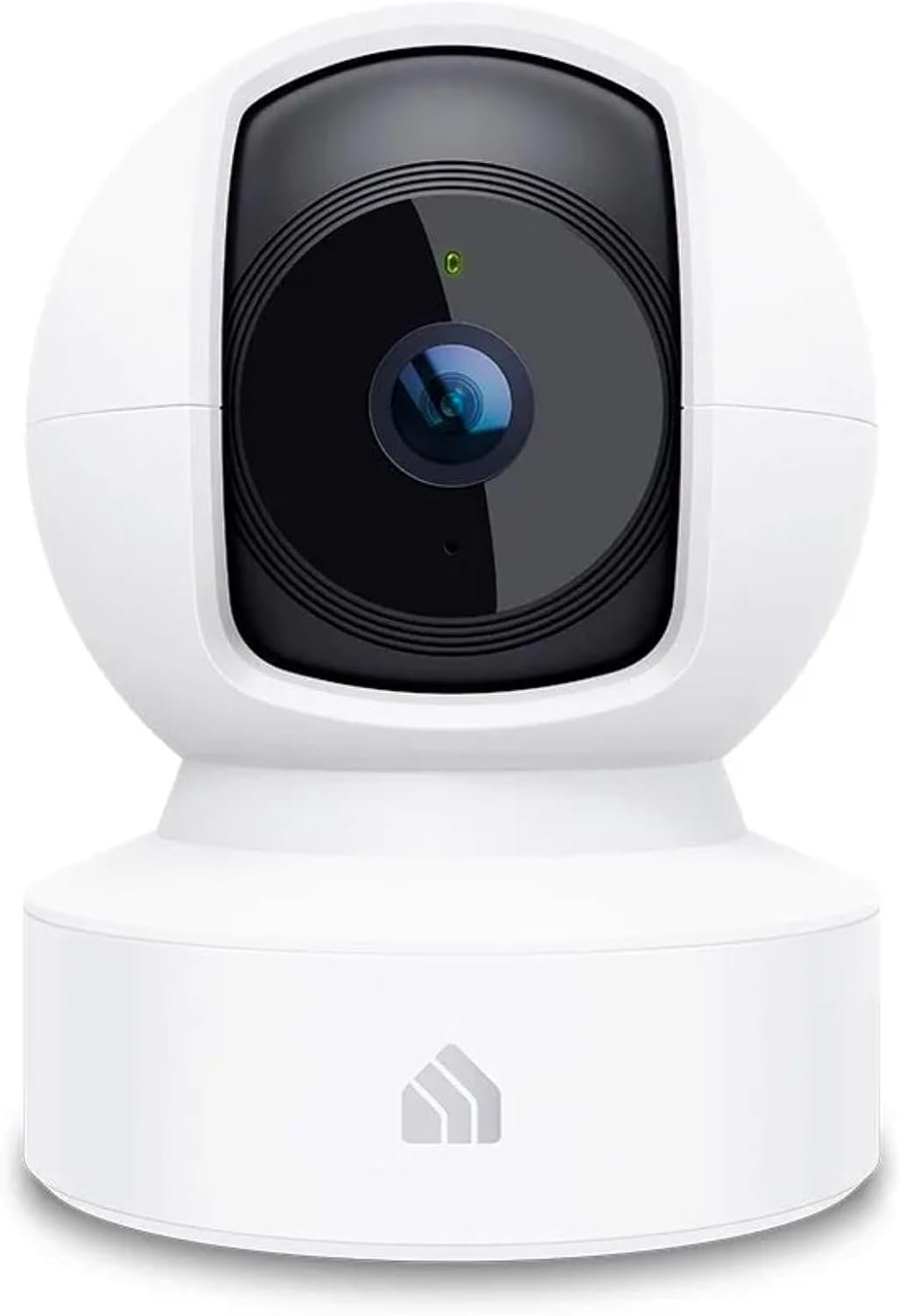
Kasa Indoor Pan/Tilt Smart Security Camera, 1080p HD Dog-Camera,2.4GHz with Night Vision,Motion Detection for Baby and Pet Monitor, Cloud & SD Card Storage, Works with Alexa& Google Home (EC70), White
$21.98
Related Products


Get the full picture of any space in your apartment, dorm or home with the Kasa Spot Pan Tilt. Receive instant alerts and live stream 1080p HD video to your smartphone, Alexa or Google Assistant supported display. The Spot even provides HD video up to 30 ft. with Night Vision. EC70 continuously records and stores footage on a local MicroSD card up to 256 GB (MicroSD card not included). Premium cloud storage options are available.
Live Stream from Anywhere with Pan/Tilt: Sharp and clear 1080p Full HD provides high quality video right in the palm of your hand. Camera is operated with the Tapo or Kasa App. Connects via 2.4GHz Wi-Fi Band
Real-Time Motion/Sound Detection: Get alerts on your smart phone whenever motion or sound is detected even at night (30ft). Enable patrol mode on your home security camera system, to make most use of cameras for home security as pet camera or nanny cam
Secure Your Videos Locally or with AWS Cloud: EC70 mini camera continuously records and stores footage or video clips on a local MicroSD card up to 256 GB. You can view up to 30 days of video history and enjoy more advanced features when you subscribe Kasa Care Plan
Smart Actions: As one of the most user-friendly security cameras, EC70 provides you a way to set your lights to turn on when your camera detects motion with Smart Actions, which allow you to create interactions between your camera and other Kasa devices
10 reviews for Kasa Indoor Pan/Tilt Smart Security Camera, 1080p HD Dog-Camera,2.4GHz with Night Vision,Motion Detection for Baby and Pet Monitor, Cloud & SD Card Storage, Works with Alexa& Google Home (EC70), White
Add a review

$21.98
Brianod –
Nice, inexpensive high resolution camera -Update – fatal flaw with usefulness -no snapshots – Update
I found a way to view the Kasa camera on Windows (sort of). I downloaded an Android image (BlueStacks 5, free) that runs Virtually on Windows 11. The only think I had to do was go into my BIOS and turn on virtualization. What shocked me is that I could go to the Google Play Store and download many of my serious apps like Kasa and Yolink (water detection devices) and they both work well. Amazingly I have both those icons on my Windows Desktop and If I just click on one of those it automatically loads Bluestacks and runs it that way. Users mostly just get games from the Play Store but kind of shocked that it works the way on apps. My win 11 PC is a 6 core Ryzen, MSI Tomahawk MB with Nvidia 1080 GPU and 32 Gig of system ram.Update again. Everything changed when I put an SD card in. I can now see the triggered clips directly recorded on the SD card in the Kasa app without removing the card. You must enable 24 hr recording for this to work. While they still don’t send you a snapshot of the triggered event there is a screen grab function that you can take while viewing a clip. So this camera is now very useful. And you don’t have to subscribe to Kasa Care to use this. Sorry about the incorrect review but they didn’t mention this in their documentation. Would still like to see this app working on a Windows PC but right now is just Apple IOS and Android supported.Update: While the picture quality is very good and can live stream well, unfortunately, this camera never sends me a picture of event that triggered my camera. When I get the notification on my phone whoever or whatever triggered the incident is long gone with no proof of the event.*** Update: This is wrong but you must put an SD card in***Now, you can put an SD card in (not supplied) the camera but to view the videos recorded but you have to pull the SD card out and view it on another device.*** Update: this is also incorrect*** Sorry.This only works if you have 24 hour surveillance set in he app. Also, you can pay for Kasa Care, their online cloud service and that costs $3 / month. Why this camera can’t just send you a snapshot of whatever triggered it, I don’t know. This camera was so inexpensive with excellent video quality, so I’m keeping it, but this is a fatal flaw in the usefulness of this camera. This could easily be fixed with a software update.I have those Kasa remote on/off light units (times 3) so I thought I’d add a Kasa camera to the mix. I went for the higher resolution camera which they refer to as QHD. It was worth the extra $10. The Kasa app works but they don’t have a PC version (Windows or Mac). So I only have the app on Android and Apple phones / tablets. I will get a micro SD card to record. Apparently, there’s a 256 gig maximum storage limit. I also like the fact that you can turn off the light that shows the unit is on. Although if you have tracking switched on the movement of the lens (and the whirring noise that makes) is a dead giveaway.
Dan Henry –
EASY & EFFECTIVE CAMERA – HERE’S WHAT YOU NEED TO KNOW:
EXTREMELY EASY TO USE • COST-EFFECTIVE • VERSATILE • SATISFYING: I happened to buy a 4-pack of Kasa smart plugs recently. After experiencing firsthand how easy it was to integrate them into my existing and very average home Wi-Fi system – not to mention tie their control into existing Amazon smart devices such as my Echo Dot and EchoPop – I simply couldn’t resist the urge to (join the rest of you in the 21st century and) purchase a camera.APPLICATION: I wanted an easy to buy, implement, use and maintain a remote controllable and reasonably ‘smart’ surveillance system – just to keep an eye on things that happen on the street. I learned very quickly the Kasa camera system has features that enable it to not only track motion but specifically people when desired (see Activity Zones IMG) ; features include various levels of tracking up to and including “Patrol Mode” which will cause the camera to rotate through the four savable “scenes” at the specified interval(s) allowing for 360° monitoring from just one camera. Even has NIGHT VISION.I actually bought two cameras and haven’t even set up the second one because the first is already doing so much!TIPS & TRICKS: Make sure you purchase a reasonable quality 64 GB mini SD card. That is the maximum size card this model of Kasa camera can utilize. TO INSERT THE CARD: using the mobile interface pan the camera upward until the mini SD card port and reset buttons are exposed (see IMGs.) Insert the card LABEL UP and press until firmly clicked and secured in its final position. I have been running the camera “24/7” (the actual mode is known as “24/7 Monitoring”) at maximum resolution of 1080p for ~ 3 days and have used less than 25% of the 64 GB capacity. (see IMGs)HOW TO SAVE EVIDENCE: Should something unfortunate occur and you find yourself in the position of needing to save that which your camera captured you can simply click on “24/7 recording” & move the saved timeline bar to the requisite point, wait for playback to start and click the 🔴 in the lower right-hand portion on the playback screen. (Note: Give the video recall some time – after all it is the camera having to go back and read saved data while still recording and saving new data, transmit saved data through the Wi-Fi network to your phone and ultimately save it in a new location. Even the fastest systems will take a moment.) Following these steps will save a video of what was recorded that you will find in your video gallery. *There is a portion of the app allocated to Activity Alerts Tracking which is available with a Kasa Care subscription; I do not have that subscription thus I am unable to speak to those features at this time but imagine they facilitate easier activity recall and saving.WHAT TO DO NOW: Click purchase. 😊 Seriously this thing is fabulous especially for the price point. Off the top of my head some of the easiest applications I can think of would be keeping an eye on your pets or your kids while they’re at home or having an extra pair of eyes when needed.*** Keep in mind this review is written from the standpoint of someone seeking easy applications and easy use – If you are looking for something that is sturdy, has own/redundant power, data storage and signaling capacity, is designed to survive not only adverse weather/climate but also potential tampering this is not the device I would recommend.
M3ALL1M –
Excellent Camera for the Price!
I’m honestly impressed with how well this camera performs. Setup was super easy with the Kasa app. It connected right away and started working within minutes. The pan and tilt feature is smooth and quiet, which makes it great for keeping an eye on pets or checking different parts of the room without needing multiple cameras.The video quality is crisp (especially for 1080p), and the night vision is surprisingly clear. Motion detection alerts come through quickly, and I love that I can view live footage anytime from my phone. It even integrates perfectly with Alexa, so I can pull up the feed hands-free.Overall, it’s reliable, easy to use, and the peace of mind it gives me is well worth it. Highly recommend to anyone looking for an affordable, high-quality indoor camera!
Samantha –
Great camera for peace of mind
It’s a great product, I only wish it allowed storage in the case I can’t look at the camera immediately. However great quality for the price. You’re still able to move it from your phone when away, and can hear audio or turn off audio
Jheisonar –
Ease of use and quality
Setup was a breeze—just downloaded the app following the steps, and it was operational within 10 minutes.” Also the video quality is excellent 👌
Ahmed Yousef –
Not bad but not as we expected
Funky Astronomer –
I installed one of these cameras in my attic to ensure that I don’t get any unwanted rodent guests. Used with the Kasa phone app this is a great monitoring solution. I added an inexpensive micro SD card for recording. You can setup multiple viewing angles to quickly survey the area remotely when required. It will automatically notify your phone when motion is detected and the recording allows to review the activity. Thankfully, so far it has only seen the occasional moth. It has saved me many trips up to the attic and has worked well for many months. I also have many kasa wifi light and outlet switches which also work very well. This is an excellent product.
Mario Pescador –
Muy fácil de instalar, se ve muy nítida la imagen, además se pueden escuchar las voces o ruidos que haya en el lugar y también se puede hablar por medio de la cámara; excelente compra! La recomiendo mucho!
Kremmen –
Yes, these do come with a US style wall charger but work with any USB chargerIt means I can keep my plan of Kasa in one house and Tapo in the otherMakes it easier to identify even though the Tapo app can separate them
Amazon Customer –
Works great. Clear picture