

EPOMAKER Aula WIN60 HE 60% Wired Gaming Keyboard with 0.02mm Adjustable Actuation, 8000 Hz Polling Rate, RGB Backlit Mini Keyboard, Hot-Swap Hall Effect Switch, for FPS Games (Black)
$6.99
Related Products




Product description
High-Performance Magnetic Gaming Keyboard with Unmatched Precision and Control  Snap Keys (SOCD)
No more halting in the heat of battle. With SOCD, only latter key is prioritized and activated when two opposing directions are pressed simultaneously
 Dynamic Rapid Triggering (RT)
RT eliminates delays from switch movement. it activates and deactivates keys instantly with minimal travel, making it perfect for FPS gaming.
 Toggle Key (TGL)
Set “hold” or “double-click” as the trigger for continuous input and “tap” as termination. Release your finger for operation elsewhere.
 DKS (Dynamic Keystroke)
The current key can be modified to bind 1 to 4 functions based on the degree of pressing and releasing.
Premium Details: Online Software, Magnetic Switch, RGB Backlit, and Package AULA Online Driver (Chrome) How to connect software
Visit the official “AULA” website.On the “Downloads” page, click on “Driver.”Locate the link for “WIN60/68 Magnetic Switch Keyboard Website Driver” and select “Standard Edition.”Click “Allow browser access,” choose your device, and then click to connect.
The video showcases the product in use.The video guides you through product setup.The video compares multiple products.The video shows the product being unpacked. magnetic gaming keyboard Merchant Video
Hall Effect Magnetic Switch Trigger precision up to 0.02mm, ensuring every keypress is accurate
Experience the unmatched speed of a magnetic keyboard with the wired version, boasting 8x faster response times. Powered by Hall sensor technology, it ensures millisecond-level precision for quicker and more accurate inputs. Plus, with fully customizable key actuation, you can adjust the trigger distance from 0.08mm to 3.4mm to suit your unique preferences.
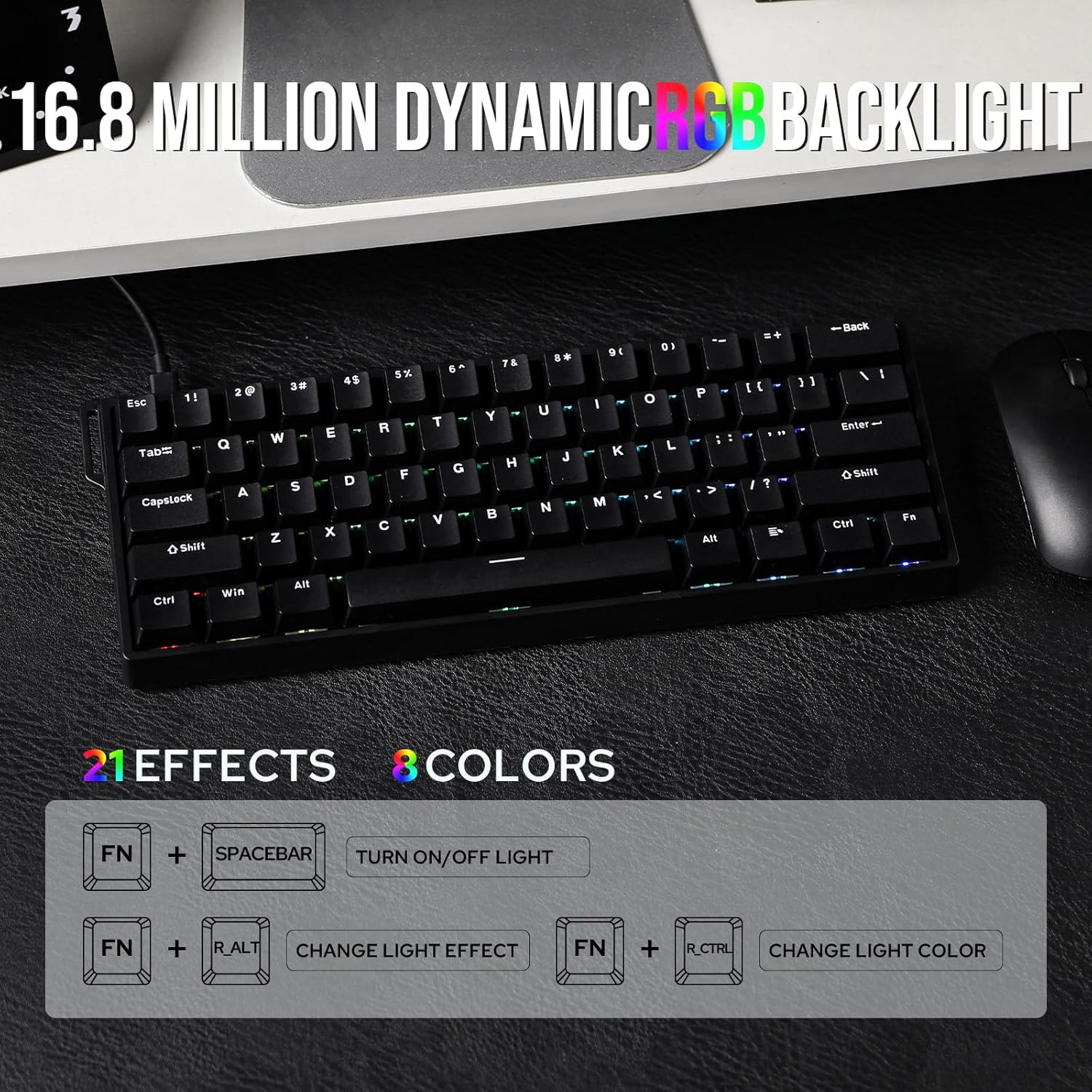
Greywood Magnetic Switch: Force: 32gf; Bottom-out Force: 50gf; Stroke: 3.4±0.1mm; Accuracy: 0.04mm  Dynamic RGB Backlight Multiple effects for preference
Experience stunning, customizable RGB effects that enhance your gaming environment, complemented by an ergonomic layout designed for comfort during extended sessions, and superior heat dissipation properties.
FN+Spacebar: Turn On/Off LightFN+R_Alt: Change Light Effect; FN+R_Ctrl: Change Light ColorFN+{ } : ” : Change Light Brightness/Speed  Package Content
1*WIN60 HE Magnetic Gaming Keyboard1*Detachable USB-A to C Cable1* 2-in-1 Keycap Switch Puller1*Detachable Ribbon; 2*Extra Magnetic Switch 
 N-key Rollover
Every keystroke is accurately registered when multiple keys are pressed at the same time.
 Powered by Hall sensor technology
It ensures millisecond-level precision for quicker and more accurate inputs
 Compatible with multiple operating systems
User-friendly customization via Web Driver allows real-time layout changes without downloads
 60% Compact Layout
Perfect for users seeking a compact keyboard without sacrificing essential functions
1 Anti-Ghosting
2 Hall Effect Switch
3 AULA Web Driver
4 Size&Weight

Switch between Mac/Win mode with FN+A/S for cross-system multitasking


 ABS Keycap
Features thick double-shot ABS keycaps, making its aesthetics as impressive as its functionality
1 for Win/Mac/Linux 2 Tray Mount 3 Hot Swap 4 ABS Keycap
How to fix the ghosting problem? Why the keys keep triggering?
Due to the special triggering principle of the magnetic axis keyboard, the bumpy movement during shipment may affect the triggering accuracy of the keyboard. Calibrating all the keyboard keys via AULA web driver can solve this problem.
What is magnetic key switches? What is the speciality of hall effect switch?
Magnetic switches use hall effect while mechanical switch use physical contact to input letters. It is resistant to dust and liquids for long lifespan. And it provide an even typing feel across switches.
What is the difference between WIN60 HE Standard version and MAX version?
The MAX version features adjustable polling rates, unlike the standard version. The differences between them lie in keyboard latency, keycap design, switch, and RT Trigger precision, and the Max version offers more RT functions.
Why is my browser unable to recognize the WIN60 HE keyboard and why can’t I use the Aula online driver?
WIN60 HE’s driver is only compatible with Chrome and browsers that use the Chromium-based, such as IE Edge or Google.
Compact Layout Gaming/Office Magnetic Keyboard from EPOMAKER
Add to Cart
Add to Cart
Customer Reviews
4.4 out of 5 stars 464
5.0 out of 5 stars 1
4.2 out of 5 stars 73
4.3 out of 5 stars 170
4.6 out of 5 stars 139
3.1 out of 5 stars 5
Price
$30.39$30.39
$36.79$36.79
$41.60$41.60
$33.49$33.49
$40.19$40.19
$159.99$159.99
Material & Color
Plastic&Black/Blue/Yellow/Red
Plastic; Black
Plastic&White
Plastic&Black/Blue/Yellow/Red
Plastic&Black/White
Aluminum&Black
Switch Types
Linear (Magnetic)
Linear (Magnetic)
Linear (Magnetic)
Linear (Magnetic)
Linear (Magnetic)
Linear (Magnetic)
Layout
60% ANSI, QWERTY US
60% ANSI, QWERTY US
65% ANSI, QWERTY US
65% ANSI, QWERTY US
65% ANSI, QWERTY US
65% ANSI, QWERTY US
Keys+Knob
61 Keys
61 Keys
68 Keys
68 Keys
67 Keys
68 Keys
Keycap Profile & Material
Cherry/OEM Profile. PBT/ABS
OEM Profile. ABS
Cherry/MDA Profile. PBT
Cherry/OEM Profile. PBT/ABS
Cherry Profile. PBT
Cherry Profile. PBT
Connectivity
USB A-C
2.4Ghz/Bluetooth/USB A-C
USB A-C
USB A-C
USB A-C
USB A-C
Battery
X
4000mAh
X
X
X
X
Hot-Swappable
Aula Magnetic Switch
Aula Magnetic Switch
Aula Magnetic Switch
Aula Magnetic Switch
EP Magnetic Pink Switch
Gateron Magnetic Jade Pro
Backlight
Per-Key RGB
Per-Key RGB
Per-Key RGB
Per-Key RGB
Per-Key RGB
Per-Key RGB
OS System
Win/Mac/Android/iOS/Linux
Win/Mac/Android/iOS
Win/Mac/Android/iOS/Linux
Win/Mac/Android/iOS/Linux
Win/Mac/Android/iOS
Win/Mac/Android/iOS/Linux
Software
AULA Web Driver (Chrome)
AULA Web Driver (Chrome)
AULA Web Driver (Chrome)
AULA Web Driver (Chrome)
EPOMAKER Software (WIN/Mac)
EPOMAKER Online Software
Special Feature
Adjustable 125 to 8k Polling
3 Modes, Adjust Kickstand
Adjustable Polling & RGB Box
Adjustable 125 to 8k Polling
0.125ms Latency & 8k Polling
CNC Aluminum Alloy Shell
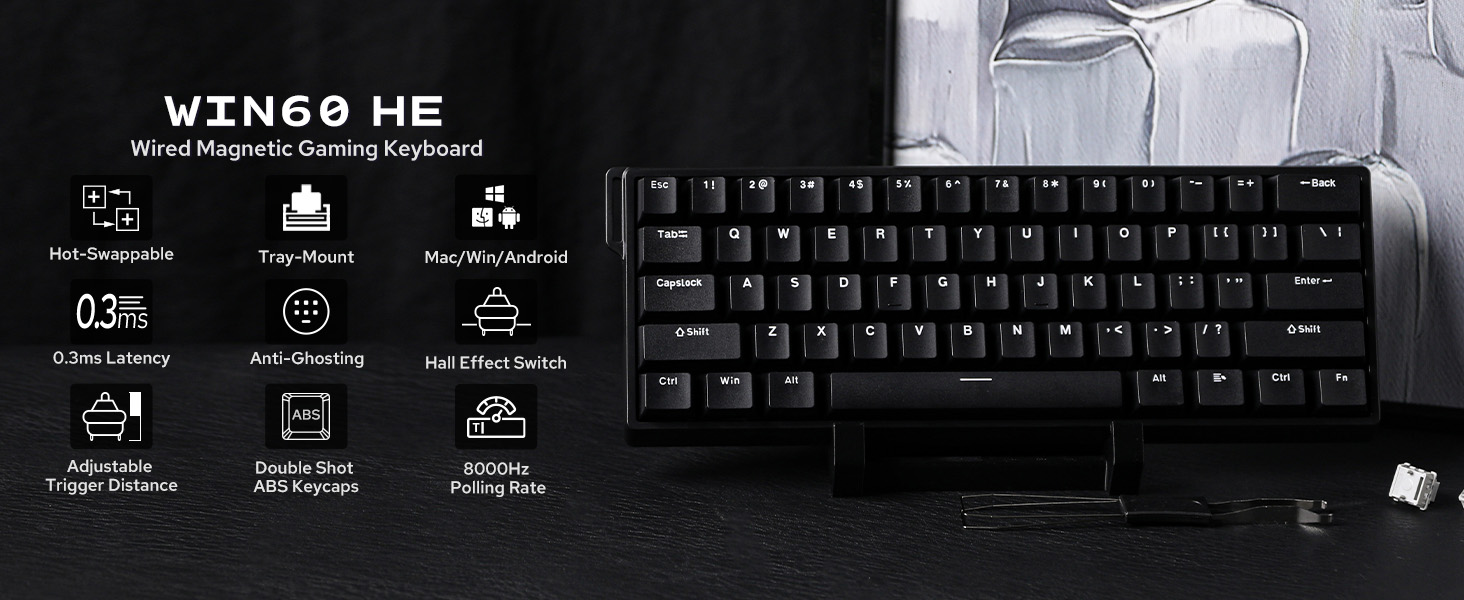
60% Ultra-compact Layout: The 60% layout of the WIN60 combines a sleek, space-saving design with enhanced typing efficiency. Its compact form allows for faster mouse movements and improved ergonomics, making it perfect for gamers and professionals alike
Snap Tap & Dynamic Keystroke: Snap Tap ensures lightning-fast directional changes in FPS games by prioritizing the latest input between two keys. Dynamic Keystroke introduces true analog input, enabling up to 4 actions in a single stroke for seamless combos and macros
Adjustable Actuation Point: The WIN60 features fully adjustable Hall magnetic switches, allowing you to customize each key’s actuation point from 0.08mm to 3.4mm in 0.02mm increments, with Max version upgraded to 0.1mm to 3.4mm per 0.01mm. Take full control for rapid keypresses or ultra-precise typing tailored to your needs
0.3ms Latency Tested, 8000Hz Polling Rate: The WIN60 keyboard is a magnetic powerhouse, featuring both 8000Hz polling and 32KHz scan rates. Its ultra-low latency outperforms most 8000Hz magnetic switch keyboards, delivering a game-changing 8x faster response than traditional gaming keyboards
Double-shot Durable Keycaps: Crafted with advanced dual-shot injection molding, the WIN60’s custom keycaps boast vibrant, durable legends that resist fading over time. This process not only enhances the keyboard’s sleek, minimalist design but also ensures a premium, long-lasting feel.
Stunning RGB Backlighting: The WIN60 HE RGB keyboard offers 20+ lighting modes and up to 16.8 million of colours available with online driver. With intuitive driver software, you can easily customize lighting effects and colours to match your unique style. Elevate your setup with a personalized and vibrant typing experience
Online WEB Driver: The WIN60 HE’s web driver simplifies settings and parameter adjustments for users of all levels. All system performance parameters are fully customizable, with real-time visual feedback, including per-key rapid-trigger and sensitivity adjustments on the keyboard preview
3 reviews for EPOMAKER Aula WIN60 HE 60% Wired Gaming Keyboard with 0.02mm Adjustable Actuation, 8000 Hz Polling Rate, RGB Backlit Mini Keyboard, Hot-Swap Hall Effect Switch, for FPS Games (Black)
Add a review

$6.99
Kayelle –
Hall effect, per-key actuation, rapid trigger, USB-C, 60%, great deal at $45
If you want a classic clicky or tactile mechanical feel, this is not that. This is a hall-effect, analog, linear, low-resistance gaming board, and it is excellent at what it is built for.How it works: each switch has a small magnet, the PCB senses the magnetic field under the plate, and the farther you press, the more you disrupt that field. The firmware turns that position into input, so you get per-key adjustable actuation, true analog control in games that support it, and rapid trigger where a key can fire again as soon as you start to release. Reset happens on release, not at a fixed reset point like traditional mechanical switches.I usually prefer >50 g linear switches and was worried about harsh bottom-outs, so I can confirm this is not a keyboard I would use long term as a typist. The short travel and quick bottom-out, with actuation adjustable anywhere between those points, are great for gaming, however. I have not used this keyboard for gaming yet, but with short fingers and many hours in WoW I often have to leave WASD to hit distant keys, and being able to set less travel on those far keys would have been a real advantage for me. Even when a game treats the keyboard as digital only, earlier activation and faster reset still make taps feel cleaner. Overall feel is low resistance and light, which favors fast taps over heavy, long-form typing.Software: the driver at device.aulacom.com worked for me and allowed per-key actuation settings. Lighting settings are easy to adjust. The macros were a little more finicky. You can save up to four profiles and a default keyboard setting.Connectivity: USB-C wired only, which keeps latency low and consistent for competitive play.Build and sound: the case is all plastic and leaves a slight plasticky smell on my hands out of the box, but it is not pingy or hollow like many budget boards. Sound is controlled, and the switches feel smooth.Layout and audience: this is a 60% layout, so no dedicated arrow cluster or function row. If your priority is long-form typing on a traditional tactile or linear board, you may prefer something else. If your priority is gaming performance, this shines.Value: at about $45, getting hall-effect switches with per-key actuation, rapid trigger, and analog potential is kind of wild. In games that support keyboard analog you get gradual input, and in titles that do not you still get earlier activation and faster resets that feel great.In the box: classic Epomaker packaging. The keyboard comes in a bag, then covered with a fitted plastic. You get a basic switch puller and keycap puller, plus two extra switches. The included cable is USB-C to USB-A. The wrist rest that comes with it has a few parts but is easy to assemble without tools, you can tighten the screws by hand.Sound: as you can hear in the sound test, the compact size makes it great for coffee shops, but the clackiness does not. Do not bring this into quiet public spaces, haha.
g –
Aula WIN60HE
This Aula Win60HE keyboard was sent by Epomaker and was priced at $46 when reviewed. I don’t believe this is a Epomaker product, as the box and keyboard are labeled Aula with no Epo markings. That and the build style is very different from other Epomaker products I have sampled.This keyboard uses hall effect switches and a 60% layout. The switches felt very fast and responsive, but lacked any kind of “soul”. The resistance and travel felt fast… but the end of the stroke is just a bottoming out hard, plastic on plastic sensation. It didn’t sound or feel great to me… but keyboards are highly subjective to personal preference.The case plastic has an affordable quality to it. The bottom has rubber non-adjustable, non-slip feet… while the front of the case features a sharp seam line. A lanyard is also present on the case. While I’m not sure of its exact function.Performance wise, this thing is fast and surprisingly accurate.I was unable to find software or a web config address on the Aula website or in the box. This keyboard claims to have customization functionality, but without software or a config, there is no way to know. The good news is the keyboard is functional straight out the box and the presets aren’t bad.This keyboard does perform. If you just want a fast, responsive and accurate keyboard at a very low price… this is all those things. If you are looking for Epomaker case quality, sound and software… this is not any of those things.
Jim D –
A killer, compact keyboard at an unbeatable price.
I picked the Aula Win60 up to pair with my Legion Go Device. The 60% size makes it perfect to take along with the portable device for comfortable ‘near fullsize’ feel.First, this is an awesome value. The keyboard is the least expensive Hall-Effect keyboard I’ve seen to date, and it feels nicely built and well assembled out of the box. A small webbed strap is included, which can be attached to add a sort of handle to the keyboard, which I love since I use it more portable than at the house. The box also contains a keycap puller tool, and 2 extra hall effect switches.Onto the keyboard sound. This keyboard types in a fairly firm, and linear feel. The keys do not make a particularly loud clicking sound when actuating like some switches, so you can use this in a variety of settings without the typing noise being distracting. Although I prefer a slightly more tactile breakover, these keys are nice to type on and allow smooth actuating and quick typing. If you are a gamer, these keys should work well for that use case as well.As a note, this is the Win60 HE (not the max) – This distinction should be made as the standard Win60 HE is a bit cheaper, and includes less lighting options for customizability. The RGB is south facing, however, and plenty bright to illuminate the keyboard (or if you swap the caps) through key glyphs.All around, a killer, compact keyboard at an unbeatable price. I’m impressed.